AI workflow automation: five processes to automate first

Most teams that look at AI automation start with the wrong question: "What can AI do?" The useful question is narrower: which of the jobs your people do every week would a machine do well, cheaply and safely, with a person checking the cases it is unsure about?
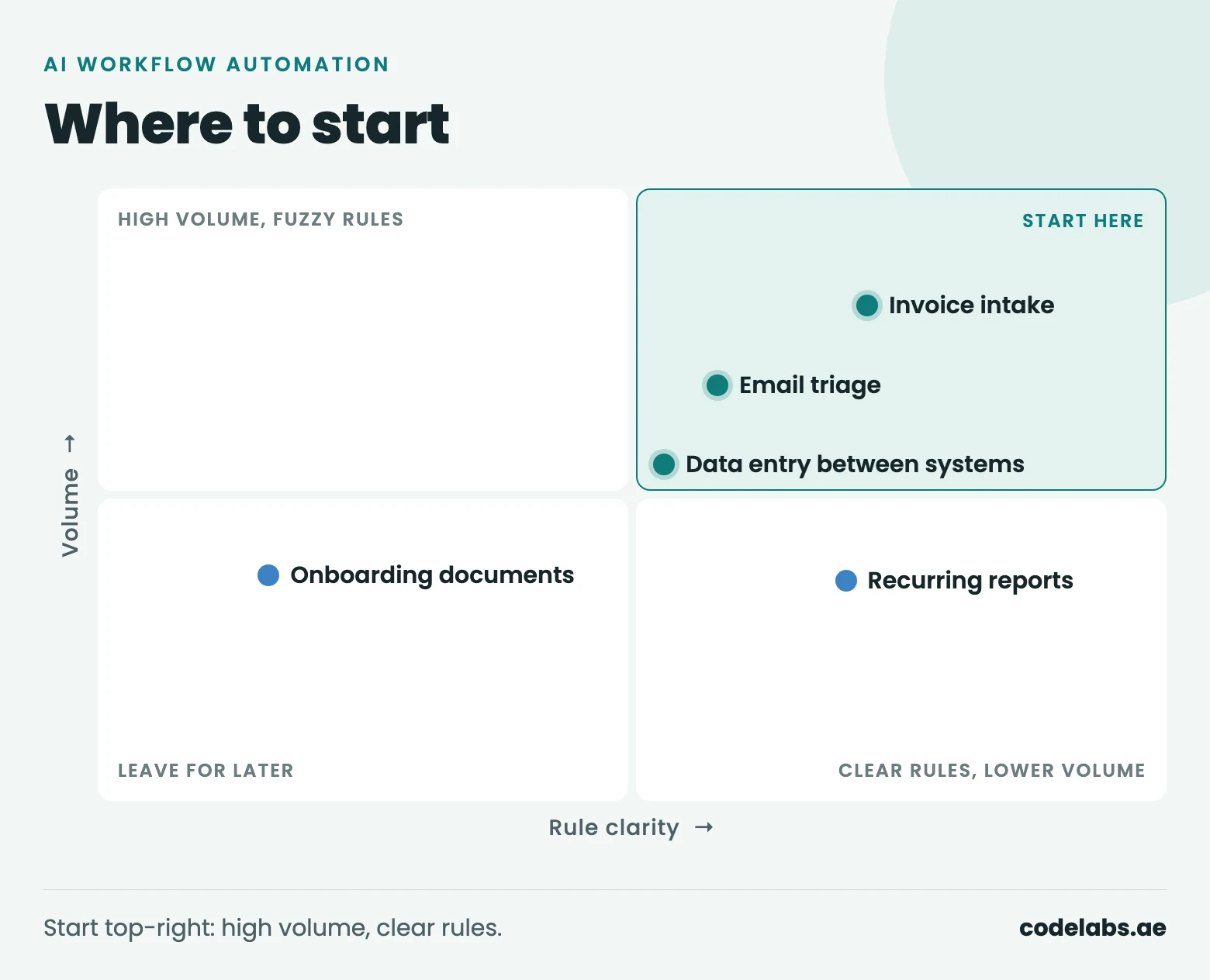
The short answer: start where the volume is high, the rules are mostly clear and a mistake is cheap to catch before it does damage. For most finance and operations teams that points to five processes: invoice and receipt intake, email and enquiry triage, recurring reports, onboarding documents, and keeping data in step between systems. This article explains how to score your own processes, what each of the five looks like when automated, and what should stay with people.
We build this kind of work as workflow automation agents, which act in your systems, and as automation tools for fixed, rule-based steps. The approach below is the one we use with clients before anything is built.
How to choose
List the recurring tasks in one team, then score each one from 1 to 3 on four questions:
- Volume. How many times a week does it happen? Automation pays back per item, so ten a week rarely justifies a project and a thousand usually does.
- Repetition. Is it the same steps every time, or does each case need a different approach?
- Cost of an error. If the automation gets one wrong, is it caught before it matters, or does a payment go to the wrong supplier?
- Data available. Is the information it needs in a system, a document or an email the automation can read, or only in someone's head?
For the cost-of-error question, score a cheap, catchable error high. Here is how the five processes in this article typically score; yours will differ, which is the point of doing it.
| Process | Volume | Repetition | Error is cheap to catch | Data available | Total |
|---|---|---|---|---|---|
| Invoice and receipt intake | 3 | 3 | 2 | 3 | 11 |
| Email and enquiry triage | 3 | 2 | 3 | 3 | 11 |
| Recurring reports | 2 | 3 | 3 | 2 | 10 |
| Data entry between systems | 3 | 3 | 2 | 2 | 10 |
| Onboarding documents | 2 | 2 | 1 | 2 | 7 |
Anything scoring 10 or more is a good first candidate. A low score on cost of error does not rule a process out; it means a person approves the result before it takes effect.
1. Invoice and receipt intake
Supplier invoices arrive as PDFs, scans and photos in a shared inbox. Someone opens each one, types the supplier, date, amounts and tax into the accounting system, checks it against the purchase order and sends it for approval.
Automated, the system reads each invoice, extracts those fields, matches them to the purchase order and the goods received, and routes it to the right approver. Invoices that match within tolerance flow through. Anything that does not, such as a price difference, a missing PO or a supplier it has not seen before, goes to a person with the mismatch highlighted.
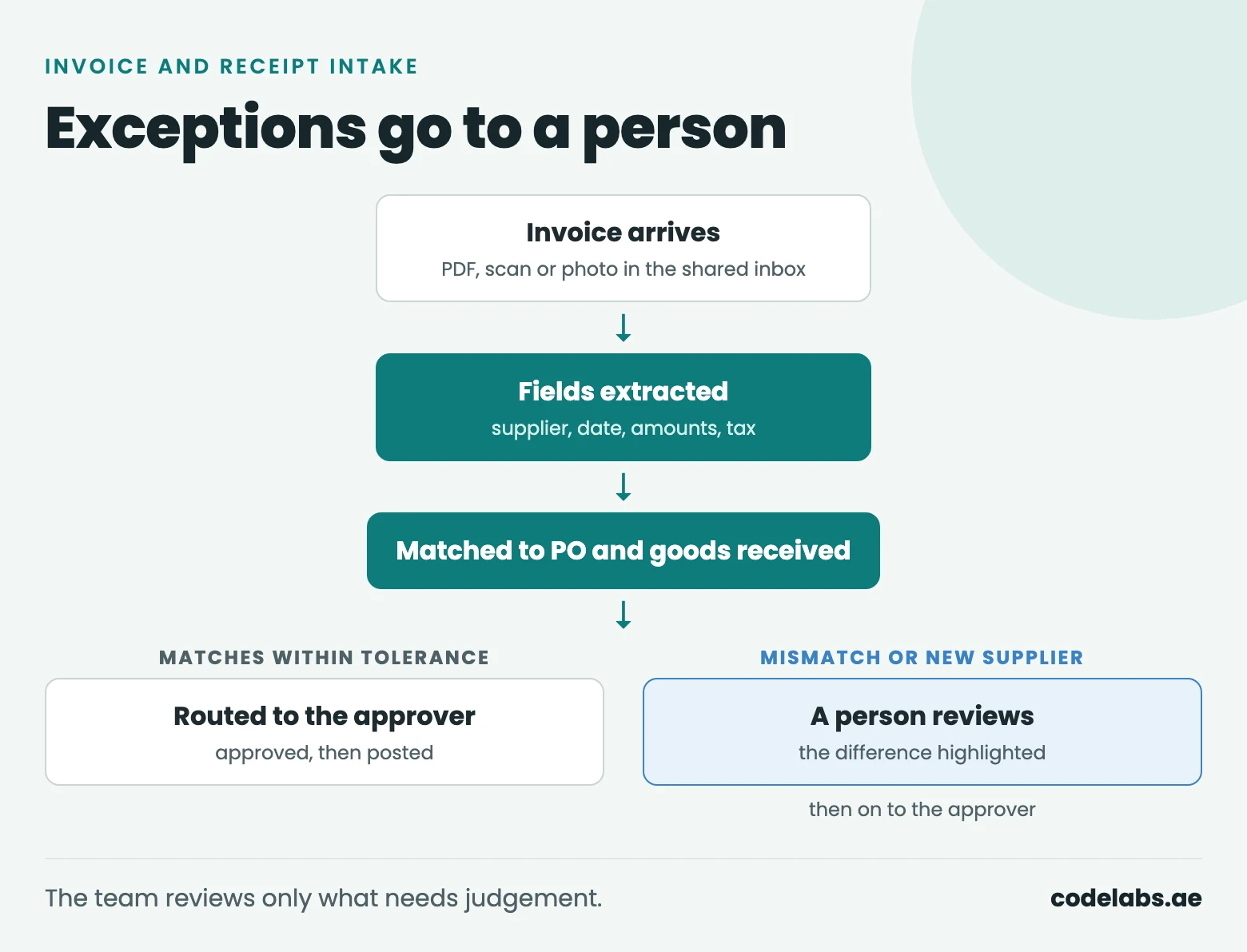
The gain is not that nobody looks at invoices any more. The team stops typing and starts reviewing only the invoices that need judgement.
2. Email and enquiry triage
A shared inbox mixes real enquiries, supplier mail, job applications and spam. Triage means reading each message, working out what the sender wants, pulling out the details and sending it to the right person, often with a first reply.
We do this on our own website. Every enquiry sent through the contact form on codelabs.ae is screened by an AI model before it reaches our team. It labels the enquiry as legitimate, uncertain or likely spam, says how confident it is, sums up in one line what the sender wants, gives its reason and suggests an action, from "respond promptly" to "ignore". Two rules keep it safe: every enquiry is still stored and delivered whatever the label says, and if the screening fails the enquiry arrives without it. The label helps the team decide what to read first; it never decides what they see.
The same pattern works for customer service, procurement and HR inboxes: classify, extract, route, and draft a reply for a person to send.
3. Recurring reports
Weekly sales summaries, monthly management packs, daily stock positions: someone exports from two or three systems, pastes into a spreadsheet, writes a few lines of commentary and emails it out. The steps are the same every time, which makes it an easy candidate.
Automated, the report pulls from each system on a schedule, builds the tables and charts, and adds a short written summary of what changed since last time. A person reads it before it goes to management, at least until the team trusts it. The summary should point to the figures it is based on, so a reader can check any claim in seconds.
4. Onboarding documents
New customers, suppliers and employees all send documents: trade licences, IDs, bank letters, contracts. Someone checks that everything is there, that it is legible and in date, and types the key fields into a system.
Automation can check completeness, flag expired or unreadable documents and extract the fields. This one scores lower because the documents carry personal data, including IDs, and a wrong field can cause trouble later. Keep a person approving every record, decide where the documents are stored and who can see them, and keep them only as long as you need to. Start it after the first two processes have proved themselves.
5. Data entry between systems
A sale is recorded in the CRM, then typed again into the ERP, then into a spreadsheet the finance team keeps. Every retyping is slow and a chance for the systems to disagree.
Connecting the systems so each record is entered once and copied everywhere else is often the highest-value automation, and much of it needs no AI at all: an integration and a set of rules. AI helps where the input is messy, such as an order arriving as free text in an email. For MyWater in Pakistan we built the automated data flow between connected water dispensers and the back-office systems, which cut manual reconciliation work. Our automation tools page covers this kind of project.
What stays with people
Good automation makes the human part of the job clearer, not smaller. Keep these with people:
- Approvals. Payments, discounts, contracts and anything that commits the company.
- Exceptions. The cases the automation is unsure about or that break the rules. Design where they go before you build the rest.
- Anything irreversible. Deleting records, sending money, messaging a customer about a complaint.
- Changing the rules. When a policy changes, a person updates the automation the same day.
Agents that act in your systems need the same limits. Our AI agents are built with clear rules for when a task goes to a person instead of the agent guessing, and with failed steps retried or escalated rather than silently dropped.
Measuring it
Measure before you build, or you will never know whether it worked. For each process, record for a week or two:
- Time per item, from arrival to done.
- Error rate: items that had to be corrected later.
- Exception share: after launch, the share of items that still needed a person. If it stays high, the rules or the data need work.
Then compare the same figures a month after launch. We scope automation around hours saved that can be measured, not automation for its own sake, and every workflow we build logs what it did, so a failure is flagged rather than missed.
Questions people ask
Do we need to replace our systems first?
No. Automation is built to connect the systems you already use, through their existing APIs, exports or inboxes. If a system has no way in at all, that is worth knowing early, and it is usually a small part of the project rather than a reason to replace everything.
How accurate is AI data extraction?
It depends on your documents: clean digital PDFs extract far better than phone photos of crumpled receipts. Test on a few hundred of your own real documents before deciding, and set the system to send any field it is not confident about to a person. Accuracy you measured on your own data is the only figure worth trusting.
What does an automation project cost?
Our published guide ranges are $3,000 to $10,000 for a focused set of automated workflows and $10,000 to $30,000 for automation spanning several systems and departments. AI agents that act in your systems run on monthly plans from $199. See the pricing page for what each includes; a real figure comes after we have looked at your processes.