Running AI agents in production: monitoring, cost and failure
An AI agent that works in a demo can still fail in its first month live. Real customers ask things nobody tested, the model provider retires the model underneath you, a busy week doubles the bill, and one slow API call leaves a customer waiting with no reply.
So the short answer is this: running an agent in production is an operations job. Record every step the agent takes, test every change against real conversations before it goes live, put a ceiling on what each conversation can cost, decide in advance what the agent does when something fails, and have a person read a sample of conversations every week. This article covers each of those in turn, for teams that have a working prototype and want to put it in front of customers.
We run the AI agent on this website ourselves, on ChannelHub, the multi-agent platform we built, and we offer agent integration and operations for agents that are already live. Where this article describes our own agent, the figures come from its live dashboard.
Why production is different
A prototype is tested by the people who built it, on the questions they expect. Production adds four things a prototype rarely meets:
- Real users. They write in mixed languages, change topic halfway through and ask things your content does not cover.
- Rare cases at volume. A problem that shows up in one conversation in two hundred is invisible in testing and happens every day once traffic grows.
- Changes you did not make. Providers release new models and retire old ones on their own schedule, and your own prices, policies and systems keep changing too.
- Cost at scale. A few cents per conversation is nothing in a demo and a real line in the budget at thousands of conversations a month.
None of these is solved once at launch. Each one needs a routine.
Trace every step
When a customer complains about an answer, you need to see exactly what happened: what the customer sent, what the agent looked up, which tools it called with which inputs, what came back and what it replied. Without that record, every problem becomes a guess. For each conversation, record:
- the messages in and out, with timestamps;
- every tool call: which tool, the inputs, the result and how long it took;
- the model and prompt version behind each reply;
- the tokens used and the cost of each step;
- how the conversation ended: resolved, handed to a person, or abandoned.
The model and prompt version matter more than they look. When answers get worse on a Tuesday, the first question is what changed, and the trace should answer it. On our own agent, every reply, tool call and token is metered against a live spend dashboard.
Traces are also personal data. Mask phone numbers, email addresses, card and ID numbers before they are stored, keep traces only as long as you need them, and limit who can read them. In the UAE that falls under Federal Decree-Law No. 45 of 2021, while DIFC and ADGM have their own data protection laws. Our guide to choosing an agentic AI provider covers where conversation data goes.
Test before every change
A change to the prompt, the model, the knowledge base or a tool can fix one answer and quietly break three others. The protection is a test set: a list of real questions with the answer, or the action, you expect for each.
- Build it from real conversations. Take the common questions, the awkward ones and every conversation that went wrong. Remove personal details first.
- Write down what a good result is. Sometimes that is a fact (the right order status), sometimes a rule (hands over when asked for a refund), sometimes a judgement a reviewer scores.
- Run it on every change. Prompt edits, model switches and knowledge updates all go through the same set, and a change ships only if the results hold or improve.
- Keep adding to it. Every failure found in production becomes a new test, so the same mistake cannot come back unnoticed.
Model changes are where this pays off. Anthropic, for example, retired nine Claude models from its API on six dates between October 2025 and August 2026, giving at least 60 days' notice each time, and other providers retire models too. With a test set, a forced model change becomes an afternoon's comparison instead of a leap of faith.
Controlling cost
Agent cost is counted per task, not per message: one customer question can trigger several model calls and tool calls before the reply. Four controls keep it predictable:
- A cap per conversation. Limit the steps and tokens one conversation may use. An agent that hits the cap stops and hands over instead of looping.
- The smallest model that does the job. Use a small, fast model for routine steps such as sorting a message or pulling out an order number, and a larger one only where the reasoning needs it. The test set tells you whether the small model is good enough.
- Caching. Model providers charge less when the start of a prompt repeats, such as the long instructions sent with every request. Keep that fixed part at the front, and cache tool lookups whose answers do not change minute to minute.
- Alerts on spend. Daily and monthly budgets, with an alert when spend runs ahead of normal, so a loop or a traffic spike is caught in hours rather than on the invoice.
When things fail
Model providers have outages, APIs time out, and one day a tool your agent depends on will return an error. Decide what the agent does in each case before it happens:
- Time limits on every call. A model or tool call that hangs should give up after a set time, not leave the customer watching a typing indicator.
- Retry once, then fall back. A short retry handles most brief errors. After that, switch to a backup model, ideally from a second provider, that has passed the same test set.
- Never guess when a tool fails. If the order system does not answer, the agent should say it cannot check right now, not invent a status.
- Hand over gracefully. When nothing else works, the agent says so plainly ("I can't check that right now, so I'm passing this to a colleague") and sends the conversation to your team with a summary.
That handover is the same one you design for frustrated customers and sensitive topics. Our article on customer support automation with a human handoff covers what the person taking over should receive.
Guardrails and permissions
An agent can only do what its tools allow, so the tool list is the main safety control. Give each agent the smallest set of tools it needs, and decide for each one whether the agent may use it alone:
- Read tools, such as checking an order or a booking, can usually run without approval.
- Write tools that change something, such as moving a booking or updating a CRM record, run within limits you set.
- Irreversible or costly actions, such as refunds, cancellations and messages to a large list, wait for a person to approve them.
- Rate limits on each tool and each customer stop a fault, or someone misusing the agent, from repeating an action hundreds of times.
Put the limits into the tools themselves, not only into the prompt. A prompt tells the model what it should do; a check inside the tool decides what it can do. Our article on AI agents vs chatbots explains why this matters once software can act.
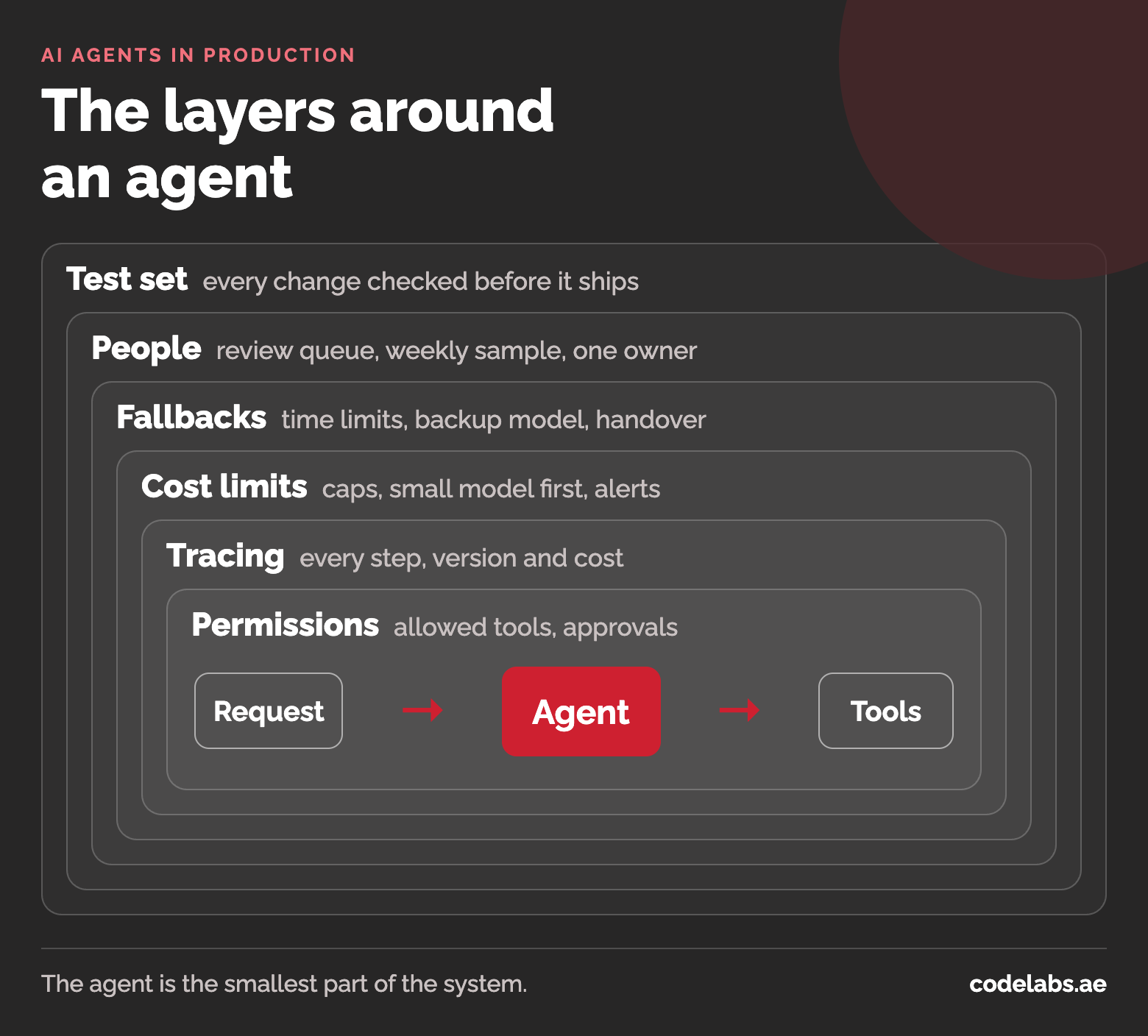
People in the loop
Dashboards show what happened; only reading conversations shows whether the answers were any good. A small review routine covers it:
- A review queue. Conversations that ended in a handover, a complaint, a low rating or a failed tool call go to a queue for a person to read.
- A weekly sample. Read a random handful of ordinary conversations too, because weak answers that nobody complained about never reach the queue.
- A short weekly review. Note what went wrong, fix the cause (missing content, an unclear rule, a tool error) and add the case to the test set.
- One owner. Name the person responsible for the agent's quality, the same way someone owns your website or your phone line.
Content goes out of date as well. When prices, policies or opening hours change, the agent's knowledge base has to change the same day, or the agent will keep giving the old answer with full confidence.
What we track on our own agent
CodeLabs BOT, the assistant on this website, runs on ChannelHub, the multi-agent platform we built and now run as a product with its own customers. It answers visitors in English, Urdu and Arabic, and asks for a name and contact number before passing a lead to our sales team.
In a recent 7-day window it handled 152 messages across 15 conversations, made 5 tool calls and spent $0.94 on AI, about six US cents per conversation. The ChannelHub case study has the details. Small numbers like these are the reason to track from day one: when traffic grows, you already know your cost per conversation and what a normal week looks like, so anything unusual stands out.
If you have an agent live and want help running it, see our agent integration and operations service, or start from the agentic AI overview.
Questions people ask
Which metrics matter most?
Start with five: conversations resolved without a person, handover rate, cost per conversation, failed tool calls and time to reply. Add customer ratings if you collect them. Watch the trend from week to week rather than single days.
How often do models change underneath us?
Often enough to plan for. Providers release new models several times a year and retire older ones: Anthropic retired nine Claude API models between October 2025 and August 2026, with at least 60 days' notice each time. Pin the exact model version in your code, and test the replacement well before the retirement date.
What does a conversation cost?
It depends on the model, the length of the conversation and the number of tool calls. Our own website agent averaged about six US cents per conversation over a recent week (15 conversations, $0.94). An agent that reads long documents or takes many steps per request costs more, which is why caps and spend alerts matter.