AI agents vs chatbots: what changes when software can act
Most businesses already have a chatbot, or have been offered one. Now the same vendors talk about AI agents and "agentic AI", and it is fair to ask whether that is a new thing or a new label.
It is a real difference, and it comes down to this: a chatbot answers, an agent acts. A chatbot reads a message and writes a reply. An AI agent can also use tools, so it can look up an order, book an appointment, open a ticket or update a record in your systems. Once software can read and write in your systems, the important question changes from "what can it say?" to "what is it allowed to do?". This article covers what that means for the work an agent can take on, the risks, the cost, and when a chatbot is still the better choice.
We build agentic AI for businesses in the UAE and Saudi Arabia, and the assistant on this website is one of our own agents, so the examples below come from systems we run ourselves.
Three generations
Website assistants have gone through three generations, and each still has its place.
- Scripted bots follow a fixed decision tree. You click buttons or type keywords, and the bot moves along paths someone drew in advance. Anything off the path ends in "Sorry, I didn't understand."
- AI chatbots understand free text and answer in natural language, usually from documents they were given: your FAQs, policies and service pages. They are far more flexible, but they can only talk.
- AI agents do what an AI chatbot does and can also call tools. They work out which steps a request needs, take those steps in your systems, and check the result before they reply.
| Scripted bot | AI chatbot | AI agent | |
|---|---|---|---|
| Understands free text | No | Yes | Yes |
| Answers from your documents | Fixed replies | Yes | Yes |
| Looks up live data | No | No | Yes |
| Takes actions in your systems | No | No | Yes |
| Needs system permissions | No | No | Yes |
What "acting" looks like
Acting means the agent does part of the work a person would otherwise do in another screen. Typical first tasks:
- Checking an order's status in your ERP or delivery system and saying exactly where it is.
- Booking, moving or cancelling an appointment in your calendar.
- Creating a support ticket or updating a customer record in your CRM.
- Drafting a quote from your price list for a person to review and send.
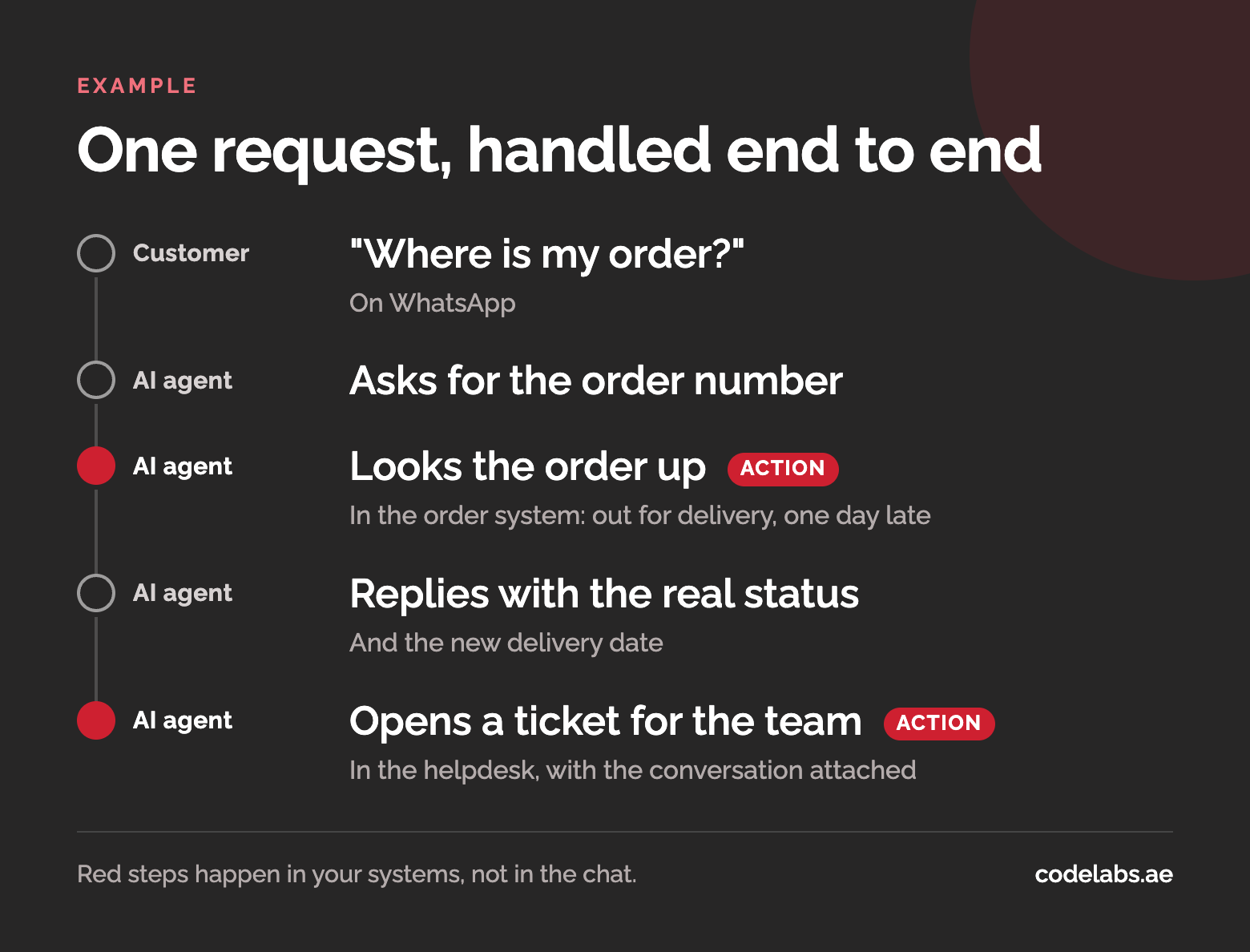
Take a customer who writes "Where is my order?" on WhatsApp. A chatbot can explain how delivery normally works. An agent asks for the order number, looks it up, and replies with the actual status. If the order is late, it also opens a ticket for your team with the conversation attached. The customer gets an answer instead of an explanation, and your team only sees the cases that need a person.
Where the risk moves
A chatbot's worst case is a wrong answer. An agent's worst case is a wrong action, so the controls change:
- Read access and write access are separate decisions. Letting an agent look up orders carries little risk. Letting it change them needs more thought.
- Anything irreversible waits for approval. Refunds, cancellations and messages sent on your behalf go to a person first, at least until the agent has a track record.
- Every step is logged. You should be able to see what the agent was asked, which tools it called, what came back and what it did next.
- Cost is per task, not per message. One request can take several model calls and tool calls, so measure the cost of a resolved task rather than of a reply.
When a chatbot is still enough
If most questions can be answered from your website and documents, and nothing needs to happen in another system, a chatbot is the simpler and cheaper choice. Answering FAQs, explaining your services and collecting a name and number for your sales team all fit here. There is no system access to secure and less to maintain.
A good test is to list the ten questions customers ask most. If the answer to each one is already written down somewhere, start with a chatbot. If most answers depend on looking something up or changing something, you need an agent.
Where agents pay off
Agents earn their keep on work that is repetitive but not quite mechanical:
- Tasks that cross several systems, such as checking stock in one, a customer's history in another and creating an order in a third.
- Rule-based work that needs reading at each step, such as sorting incoming email, pulling details out of documents, or deciding which team a request belongs to.
For many businesses in the UAE these requests arrive on WhatsApp, often in a mix of Arabic and English. That suits an agent, which reads free text, far better than a menu-driven bot.
If staff spend hours copying information between screens, or answering the same status question all day, that is usually the first place to look. That is the kind of work we build AI agents for WhatsApp, web and API to take on.
Scoping a first agent safely
Start with one type of request that comes in often and has a clear right answer, such as order status or appointment changes. Count how many arrive each week and how long each one takes your team today, so you can tell later whether the agent made a difference.
Then give the agent permissions in stages, the way you would with a new employee:
- Read-only first. The agent answers questions using live data but changes nothing. You learn how it behaves with real customers at very little risk.
- Then write actions, with approval. It prepares the ticket, the booking or the quote, and a person approves it with one click.
- Then autonomy for low-risk steps only. Once the logs show it gets a step right consistently, let it take that step on its own, and keep approval for the rest.
The assistant on this website is a small example of an agent at work: it answers from our knowledge base, asks for a name and a contact number, and passes enquiries to our sales team. The ChannelHub case study shows how it is built and run.
Questions buyers ask
Is an AI agent the same as RPA?
No. Robotic process automation (RPA) repeats fixed steps on screens and forms exactly as they were recorded, which works well when the input never varies. An agent reads unstructured input, such as an email or a chat message, and decides which steps to take. The two work well together: an agent can hand a structured task to an existing RPA bot as one of its tools.
Will agents replace our staff?
In most businesses they take over the repetitive part of a job, such as status questions, data entry and first-line triage, and leave people the exceptions, approvals and relationships. The usual aim is to let the same team handle more, not to remove roles. Plan for who reviews the agent's work, because that job does not go away.
What does an agent cost to run?
It depends on the task more than on the number of messages: how many steps a request takes, how much your knowledge base holds and how many systems the agent calls. Ask any provider for the cost of a resolved task at your volume. We set out what to ask, with our own assistant's running cost as an example, in choosing an agentic AI provider in the UAE.