Customer support automation with a human handoff that works
Most support teams can name the questions they answer all day: where is my order, can I change my booking, what is your returns policy. Automating those is the easy part. Customers judge the whole system by what happens when the automation reaches its limit.
So the short answer is this: automate the lookups and the questions your own content already answers, and design the handoff to a person before anything else. Decide which requests the AI agent must never handle alone, which signals send a conversation to your team, and what the person taking over receives, so the customer never has to repeat themselves. This article walks through that order of work, from sorting your tickets to measuring the result.
We build customer support automation on WhatsApp, web chat and email for businesses in the UAE and Saudi Arabia, and we run an AI agent on our own website, so the advice below comes from systems we operate.
Sort your tickets first
Before choosing what to automate, read what customers actually send you. Export a month or two of emails, chats and WhatsApp messages and tag each one with the reason the customer got in touch. A month of most support inboxes comes down to the same twenty or so questions. Then sort those reasons into three groups:
- Lookups. The answer lives in one of your systems: order status, booking details, an account balance. An agent can answer these if it can read that system.
- Procedures. The answer is already written down: the returns policy, delivery areas, how to change a booking. An agent can answer these from your own content.
- Judgement calls. Complaints, exceptions, refunds outside policy, anything that needs someone to decide. These stay with people.
Next to each reason, note how many arrive each week and roughly how long one takes your team. Volume multiplied by handling time shows where the hours go, and it gives you a baseline to measure against later.
What to automate
Start with the lookups and procedures that arrive most often:
- Order and booking lookups. The agent asks for an order or booking number, checks your system and replies with the real status, not a general explanation of how delivery works.
- Questions answered from your own content. Policies, opening hours, delivery areas and prices, answered from your documents and website. A knowledge agent looks up the relevant passage before it answers, so the reply matches what you have published.
- Bookings and changes. Booking, moving or cancelling appointments within rules you set, such as how much notice is needed.
- Collecting details before a person picks up. Even when the agent cannot solve the problem, it can gather the order number, contact details, photos and a description, so your team starts with everything it needs.
The last one is easy to overlook. A conversation that reaches a person with the details already collected saves several rounds of back-and-forth, even though the agent did not resolve it.
When to hand over
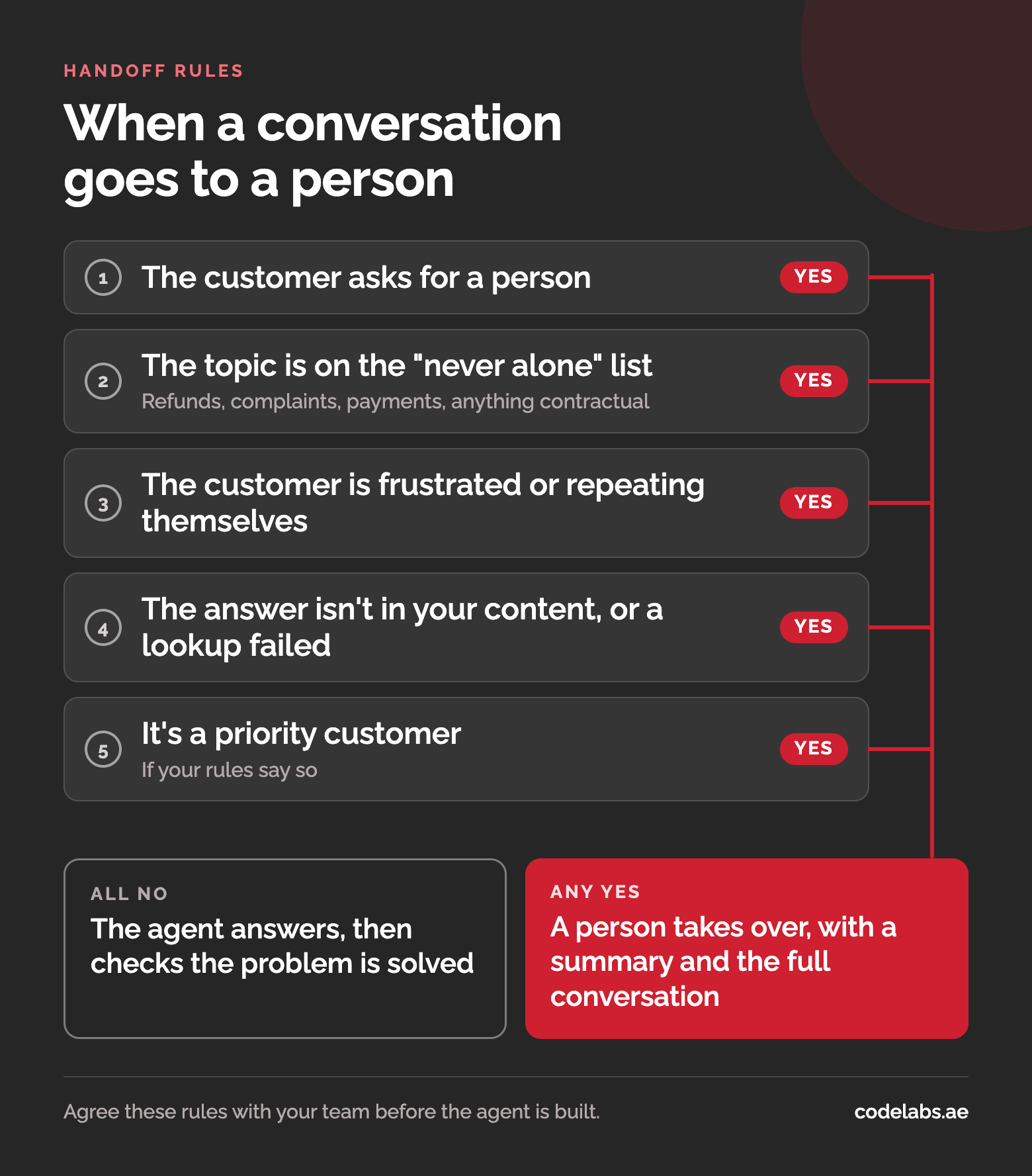
The handoff rules are the most important design decision, so agree them with your team before anything is built. Hand the conversation to a person when:
- The customer asks for one. Immediately, every time. Making someone argue with a bot to reach a person is the quickest way to lose their trust.
- The topic is on the "never alone" list. Refunds, complaints, payment and account problems, and anything contractual go to a person by design, not by accident.
- The customer is frustrated or repeating themselves. The same question asked twice, an answer the customer rejects, or angry language are all signs the agent is not helping.
- The agent is not confident. If the answer is not in your content, or a system lookup fails, the agent should say so and hand over rather than guess.
- The customer matters more than the rule. Some businesses send their largest accounts to a person whatever they ask.
Passing context
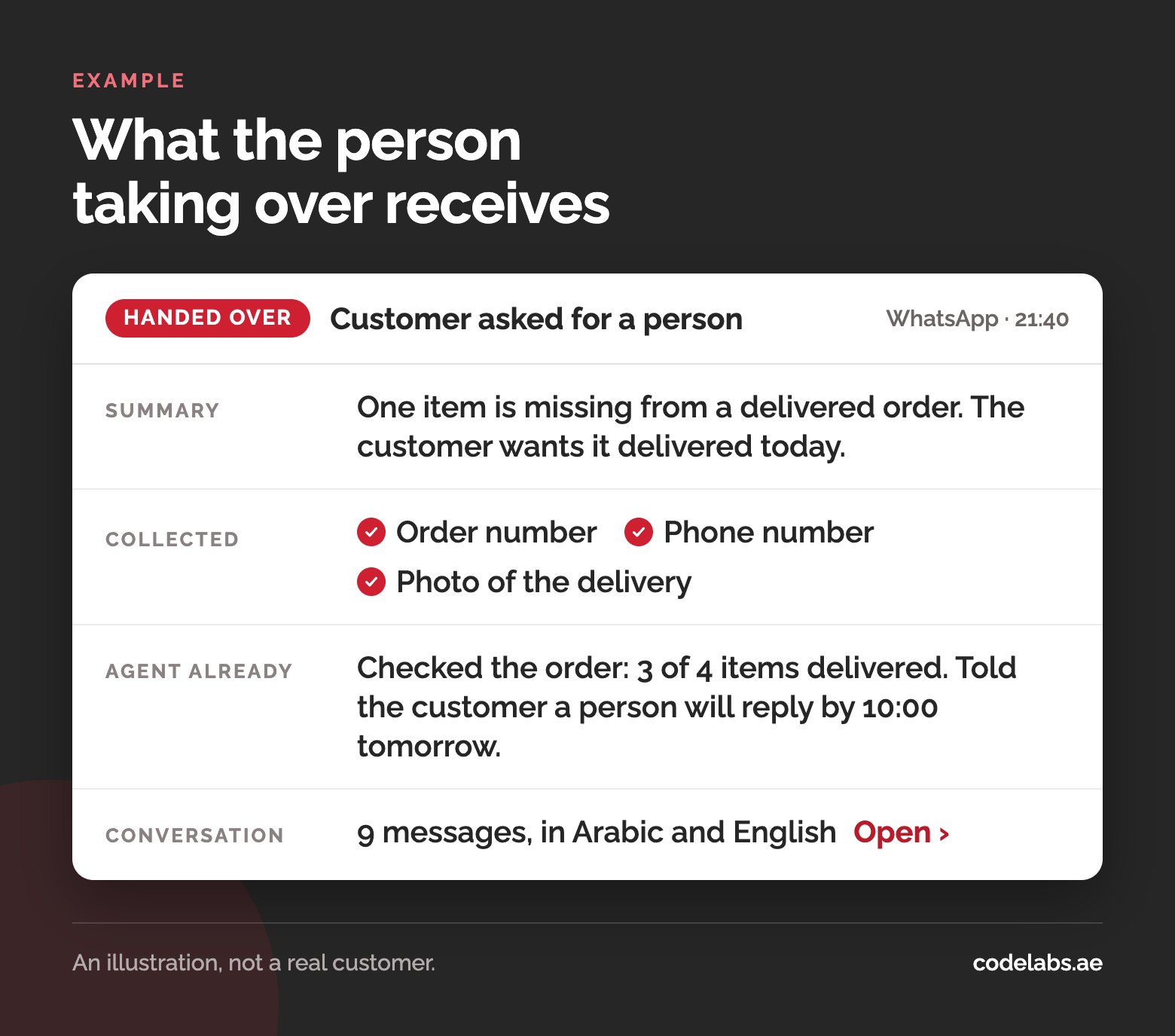
A handoff only works if the person taking over starts where the agent stopped. The worst outcome is a customer who explains the problem to the agent, gets transferred, and is asked to explain it all again. Pass three things with every handoff:
- A short summary of what the customer wants and why the conversation was handed over.
- The details already collected, such as the order number, contact details and anything the agent looked up.
- The full conversation, in case the summary misses something.
Then tell the customer what happens next: that a person is taking over, and roughly when they will reply. If the handoff happens outside working hours, say when the team is back rather than leaving the customer waiting in silence.
On WhatsApp, timing comes with a rule. A business can reply freely for 24 hours after the customer's last message. Once that window closes, it can only send pre-approved template messages, so plan how your team picks up conversations that are handed over late in the evening.
Channels
Customers write on whichever channel is closest: web chat on your site, WhatsApp or email. Run one agent across all of them, with one knowledge base and one set of handoff rules, so a policy change is made once and the answer is the same everywhere. Each channel still needs its own touch: an email reply can be longer, while WhatsApp and chat replies should be short.
Language matters as much as channel. The assistant on our own website answers in English, Urdu or Arabic, in whichever language the visitor writes in. Test with your customers' real messages, including ones that mix Arabic and English, and check whether your knowledge base exists in both languages. If your team works mainly in English, the handoff summary can be written in English while the conversation stays exactly as the customer wrote it.
Measuring it
The number most often reported for support automation is the containment rate: the share of conversations that never reach a person. On its own it is misleading, because a bot that makes it hard to reach a person contains more conversations and serves customers worse. Measure these instead:
- Resolved without coming back. The customer's problem was solved and they did not get in touch again about the same thing within a few days.
- Escalation rate, with reasons. How many conversations were handed over, and which trigger sent each one. A growing number of "the answer is not in your content" handoffs tells you what to add to the knowledge base.
- Time to resolution, including the time a person took after the handoff.
- Customer satisfaction, from a one-question survey at the end of the conversation.
Read a sample of conversations every week as well. The numbers show where something is wrong; the transcripts show what.
Rolling it out
Roll out in stages, so each one teaches you something before the next:
- After hours first. Outside working hours the alternative is no answer at all, so the risk is low. The agent answers what it can and collects the details for the morning.
- Then during working hours, with your team watching the handoffs and filling gaps in the knowledge base as they appear.
- Then new request types, one at a time, once the first ones are resolved reliably.
The assistant on this website is a small working example: it answers from our own knowledge base, asks for a name and a contact number, and passes each enquiry to our sales team. The ChannelHub case study shows how it is built and run. For how an agent differs from the chatbot many businesses already have, see AI agents vs chatbots.
Questions buyers ask
Will customers accept talking to AI?
Most customers want a quick, correct answer and are happy to get it from an agent. What they resent is being stuck with a bot that cannot help and will not let them reach a person. Say clearly that they are talking to an AI assistant, and keep a person one message away.
What share of requests can be automated?
It depends on your mix, and anyone who quotes a percentage before reading your tickets is guessing. Sorting a month of tickets into lookups, procedures and judgement calls usually shows the answer: the first two groups are the ones an agent can take on.
Can it run on WhatsApp?
Yes, through the WhatsApp Business API, the official route for businesses. Meta's terms allow businesses to use AI to serve their own customers there. The restriction Meta introduced in January 2026 is aimed at general-purpose AI assistants offered as a product in their own right. Plan around the 24-hour reply window described above.