Retail video analytics: footfall, dwell time and shopper behaviour

Your POS tells you what sold. It can't tell you how many people walked in and left with nothing, which aisle they gave up in, or how long the queue was when they did. The cameras already on your ceiling can.
The short answer: retail video analytics turns store cameras into numbers. It measures footfall, how long people stay in each zone, where queues build and how many passers-by step inside. Those numbers start to change decisions when you join them to sales. Footfall alone is a busy chart; footfall against transactions gives you a conversion rate you can act on. For that to work, the entrance camera has to be in the right place, and you have to check its count by hand.
We build this as retail analytics on your existing cameras. Below: what cameras can measure, how accurate people counting is, how to turn counts into decisions, what privacy requires and how to start small.
What cameras can measure
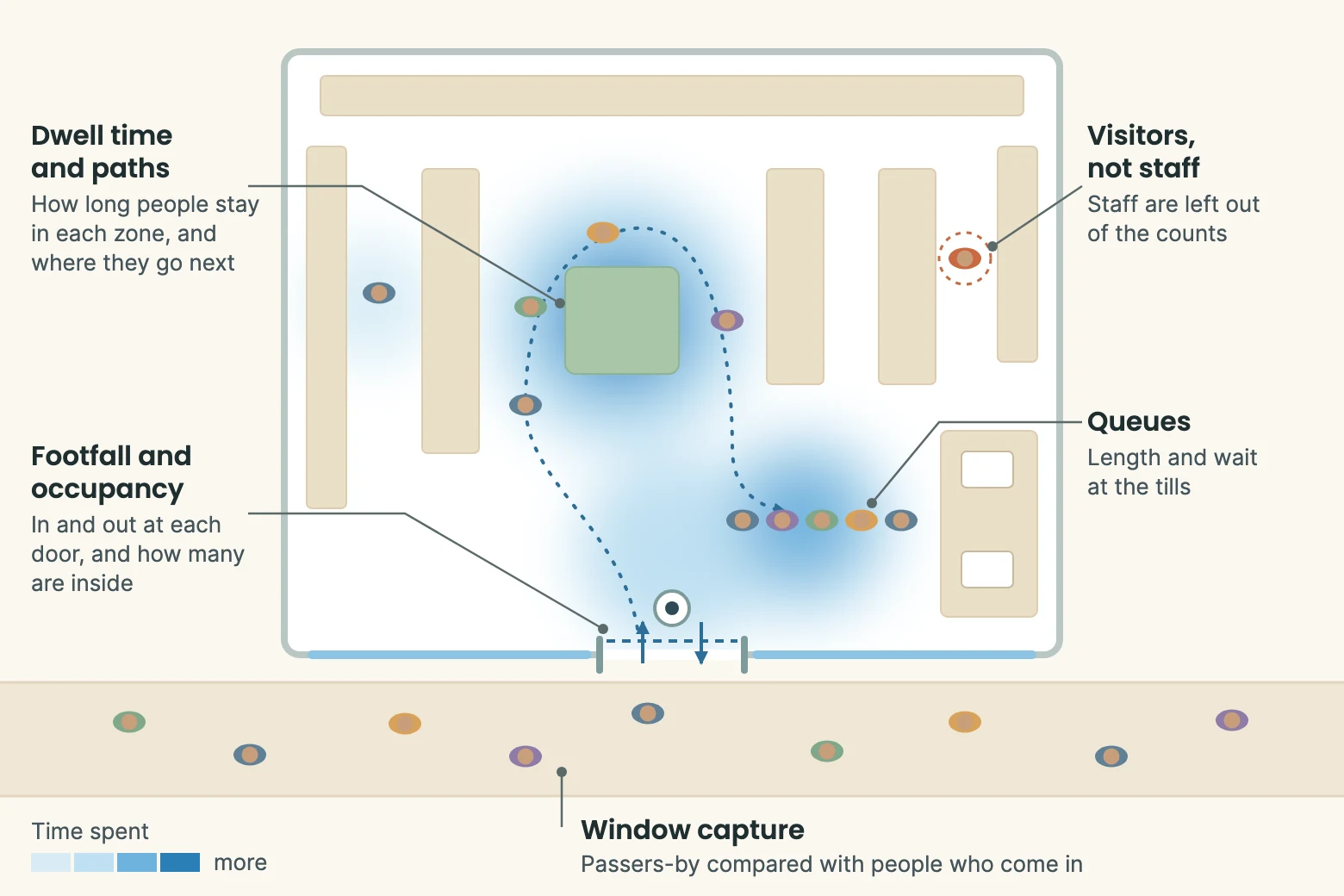
Five measures cover most of what retailers ask for:
- Footfall and occupancy. People in and out at each entrance, and how many are inside right now.
- Dwell time and paths. How long people stay in each zone and where they go next. A heatmap shows the same data as a picture.
- Queues. Queue length and waiting time at tills and service counters.
- Window capture. Passers-by compared with the people who come in, which shows how well the shopfront works.
- Visitors, not staff. Staff walking the floor inflate every count, so agree how they will be left out.
Our people counting and retail analytics projects cover these for retailers, fuel stations and commercial spaces, with the results fed into POS and marketing dashboards.
How accurate people counting is
You'll often see 95% or more quoted. Camera maker Axis won't publish a figure at all: its 2025 white paper says accuracy "neither can nor should be reduced to a general accuracy percentage", because every installation is different. Camera placement, lighting and how busy the scene is all move the result.
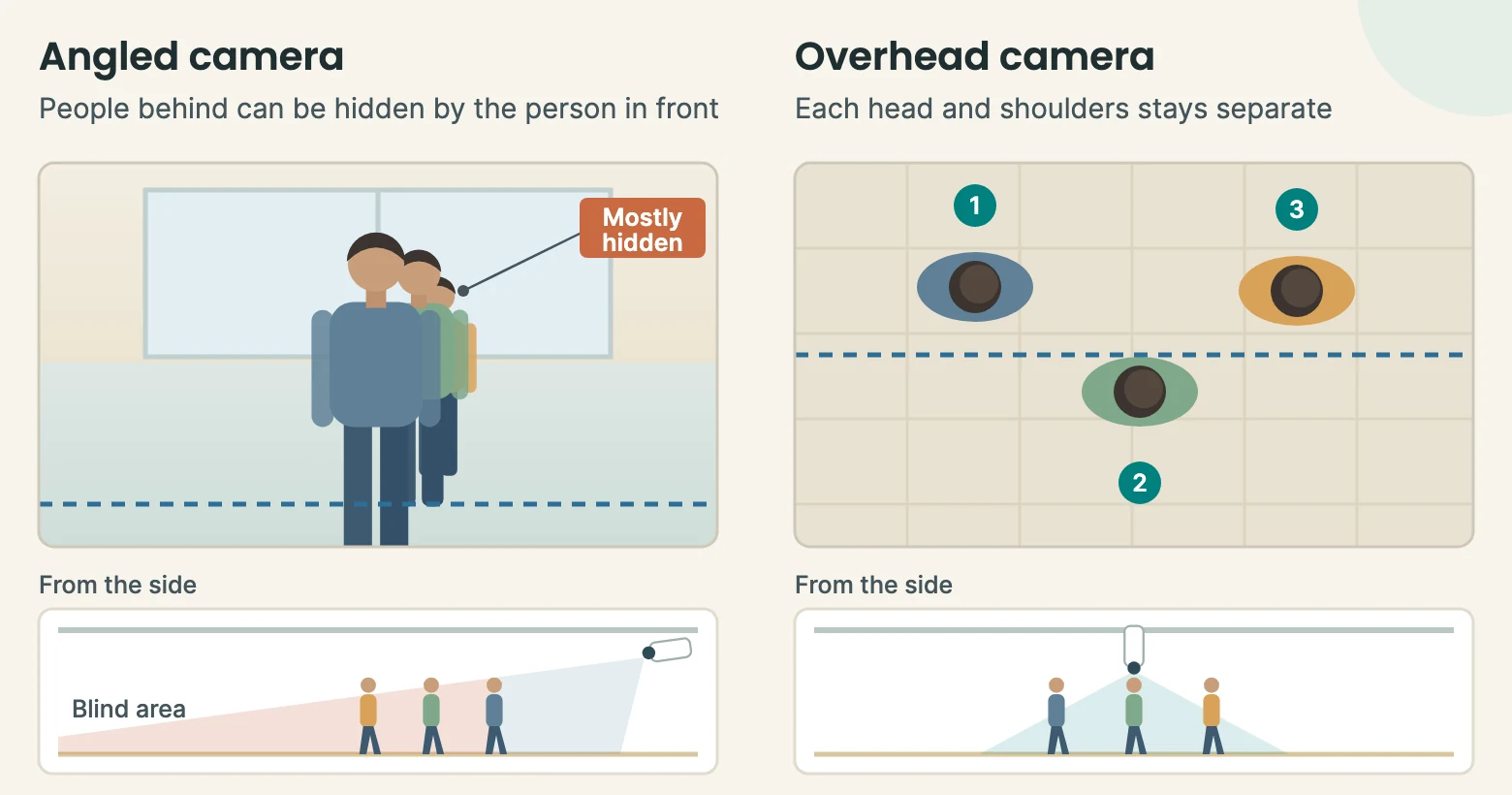
At a door, the biggest factor is usually the camera's angle. An angled camera sees people one behind another, so someone walking behind a friend can disappear from view. A camera looking straight down sees separate heads and shoulders, so a group stays countable. That is why Axis recommends top-down mounting where people often block each other.
It is also the opposite of what PPE detection needs, where a straight-down view hides the vest. One camera rarely suits both jobs.
Even a good overhead camera has awkward cases: children walking close to a parent, pushchairs, people who step in and turn straight back, and anyone lingering in the doorway. So measure it on your own door. Axis suggests counting 200 people going in by hand, then comparing with the system. Each person of difference is half a percentage point, so a system showing 192 is 4% out. Repeat for people going out, in a quiet hour and a busy one. Hand counts aren't perfect either, especially in crowds, so use recorded video where you can.
For a daily health check, compare ins and outs. In a store with a single entrance the two should nearly match by closing time. Treat that as a warning light, not proof: a system that misses the same share in both directions will still balance.
From counts to decisions
Heatmaps make good slides, but a bright patch only tells you where people stood, not whether they bought. The number that joins cameras to sales is conversion rate: transactions divided by visitors.
| Week 1 | Week 2 | |
|---|---|---|
| Visitors (cameras) | 5,000 | 6,000 |
| Transactions (POS) | 1,000 | 1,020 |
| Conversion rate | 20.0% | 17.0% |
On POS alone, week 2 looks like a small win. With footfall beside it, 1,000 more people came in and only 20 more bought. Either the extra visitors weren't buyers, or something stopped them. That is the question worth asking, and it points to three common uses:
- Staffing. Compare the roster with footfall and conversion by the hour. Hours where conversion drops as footfall peaks are often hours you are short of staff.
- Layout and promotions. Change one zone, then compare dwell time and conversion before and after.
- Tenant reporting. Malls can share entrance and zone footfall with tenants, which gives leasing and marketing talks a common set of numbers.
Shopper privacy
Counting doesn't need to know who anyone is. Footfall, dwell time, heatmaps and queues can all work from movement alone, and a system can keep the numbers without storing the video.
Some systems, including ones we have built, go further: recognising repeat visitors, estimating age and gender, or reading facial expressions. Those features analyse faces, so treat them as a separate decision. The UAE's federal Personal Data Protection Law lists biometric data among its sensitive categories, and the DIFC and ADGM free zones have their own rules. Take legal advice before turning any of them on.
Whatever you measure, put up clear signs, keep retention short and limit who can see footage. In a mall, check who owns the cameras and the data, and what the tenant agreement allows, before you start.
Hardware and setup
Start with what you have. Dwell time, heatmaps and queues often work on existing CCTV, because those cameras already look across the floor. Entrances are the usual exception: if the door camera is angled and the doorway gets busy, add an overhead camera there. As a rule of thumb, an overhead camera covers a width about equal to its mounting height, so a wide entrance may need more than one.
Processing can run in the cloud or on a device in the store. Running it on site keeps video in the building and sends only the numbers to the dashboard, which also uses less bandwidth.
Starting small
Pick one store and run it for four weeks. Spend the first week checking the door count by hand. Then line up footfall and POS data by the hour and look for the hours where conversion drops. Choose one decision to test, such as a roster change at the peak, and see whether conversion moves.
A single-site pilot typically goes from assessment to a live dashboard within a few weeks, depending on camera readiness and POS integration. Our published guide range is $5,000 to $15,000 for a single store and $15,000 to $50,000 for multiple outlets; a real figure comes after we have looked at your cameras. See the pricing page for what each covers.
Questions people ask
Do we need new cameras?
Usually not for the shop floor. Existing CCTV can often cover dwell time, heatmaps and queues. The entrance is the likely exception, because an accurate count needs a clear view of each person crossing the door. A site assessment shows which cameras can be used as they are.
Is this facial recognition?
Not for counting. Footfall, dwell time, heatmaps and queues don't need to identify anyone. Features such as repeat-visitor recognition or expression analysis do analyse faces, so they should be a separate, deliberate choice, with legal advice first.
How accurate is people counting?
It depends on your door, your camera and how busy it gets, so be wary of any single figure. Count 200 people by hand and compare them with the system, in a quiet hour and a busy one. That gives you a number that means something for your store.