PPE detection on existing CCTV: what it can and can't catch
A safety officer can't watch every camera on every shift, and a weekly walk-round only shows what people were wearing during that walk. If you already have CCTV on site, the obvious question is whether software could do the watching.
The short answer: yes, for some items and in some camera views. AI PPE detection can run on most existing CCTV and flag people without a hard hat or hi-vis vest, provided they fill enough of the frame and the camera isn't looking straight down on them. It is far weaker on small items such as gloves, safety glasses and ear defenders at normal CCTV distance. Its limits are mostly physical (angle, distance and light), plus how closely the footage it was trained on matches your site.
We build this as a PPE detection system for existing CCTV. Below: what it does, what published tests show, how to check your own cameras, how to limit false alarms and how to run a pilot that proves it either way.
What PPE detection does
PPE detection, often sold as PPE compliance monitoring, is a computer vision model reading your video. It finds each person in the frame, then checks for the items required in that area: a hard hat, a hi-vis vest, a mask, or whatever your site rules say. When a required item stays missing, the system raises an event with a snapshot, the camera, the zone and the time. Nobody has to sit and watch a live feed. A supervisor only sees the moments that need a decision.
That is how our PPE compliance project works. The model classifies helmets, vests and masks as present or missing, the system connects to the existing surveillance setup, and a dashboard shows compliance rates, violation trends and locations.
You won't find an accuracy figure for that project here. Any such number only holds for the cameras it was measured on, as the next section shows.
What it catches reliably, and what it struggles with
Three things decide whether an item can be detected: how many pixels land on it, whether it's visible at all, and whether it stands out from what's around it. That splits PPE into three groups.
- Usually workable on CCTV: hard hats and hi-vis vests. A hat sits at the top of the body and is rarely hidden. A vest covers a large part of the torso. Both show up at a distance, although a jacket over a vest or a pale hat against a pale wall will still cause misses.
- Needs a closer camera: gloves, safety glasses and ear defenders. They are small, they move, and hands are often behind a tool or a body. A camera set up to cover a whole yard gives them very few pixels.
- Often beyond a fixed camera: whether gear is worn properly. Some cases show clearly, such as a hard hat carried in the hand. Others don't: a fixed camera rarely shows whether a chin strap is fastened or a harness is clipped to its anchor.
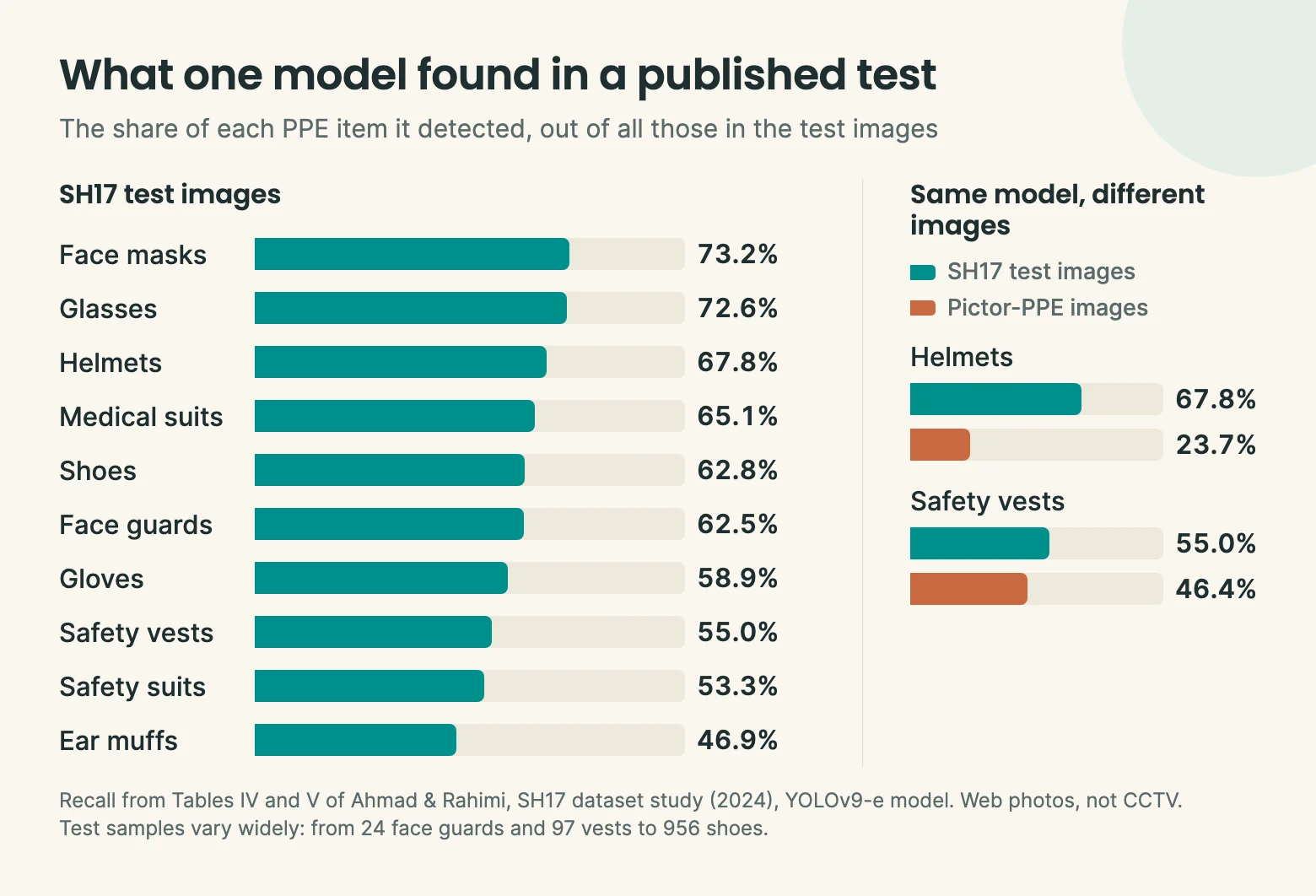
Published tests are humbling. The SH17 study trained a detection model on thousands of labelled photos, then tested it on images it hadn't seen. It found 89.2% of people but only 67.8% of helmets, 58.9% of gloves, 55.0% of safety vests and 46.9% of ear muffs. No PPE item passed 75%. Vests scored lower than you might expect, which the authors put down to having few vest examples to train on.
Those were web photos rather than CCTV, so the ranking won't carry straight across to a site camera. Glasses did well there, but they'd get far fewer pixels from a camera covering a yard.
The more telling result came when the same model was tested on a different set of images. It found only 23.7% of helmets, often mistaking a helmet for a bare head. That is the real lesson: a model that does well on one set of images can fall apart on another, so the only accuracy figure worth trusting is one measured on your own footage.
Why your cameras matter more than the model
Most of what decides a PPE project is fixed before any AI runs: where the camera is, how far away people are and what the light is doing.
Angle
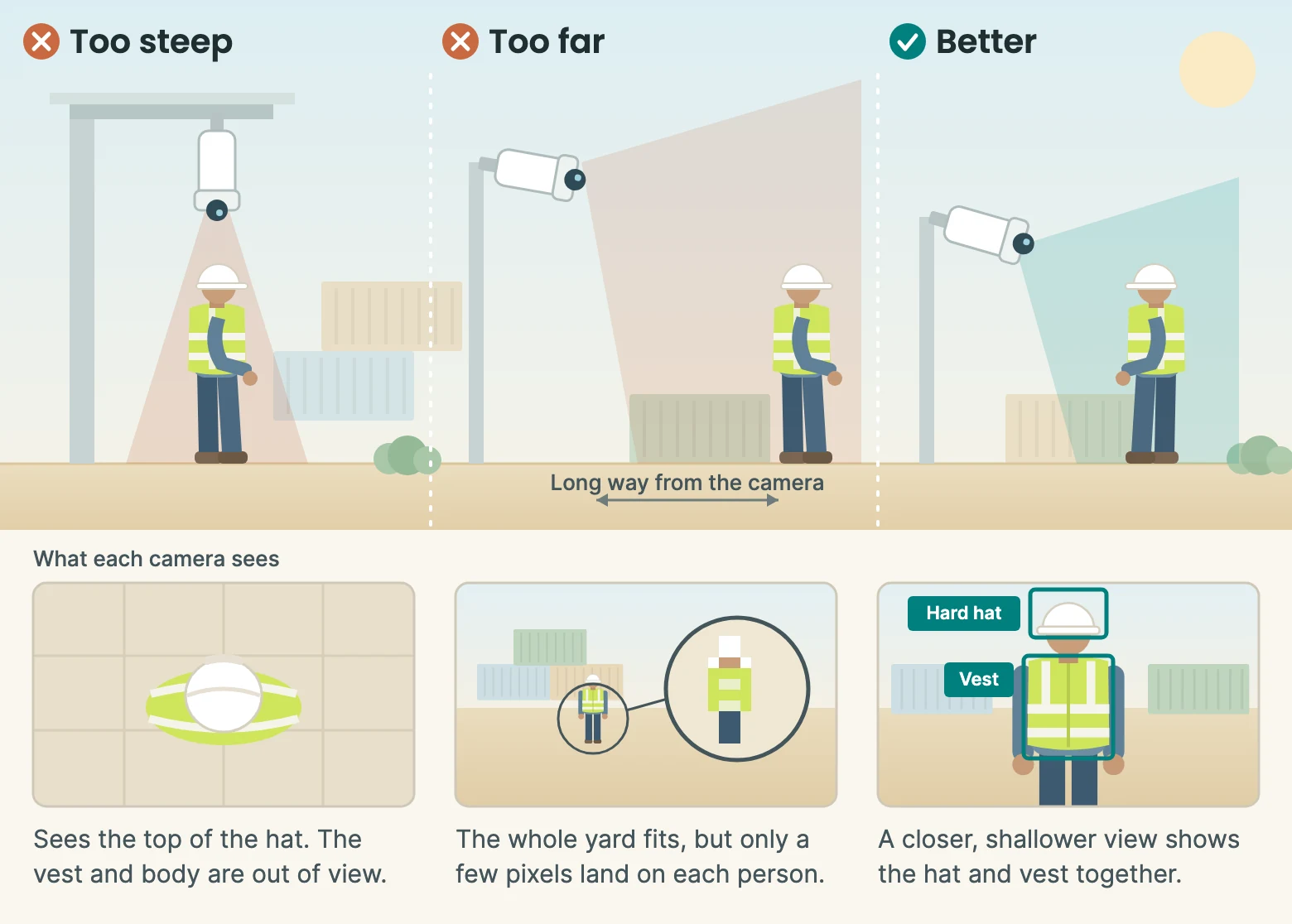
A camera looking straight down sees the top of a hard hat and not much else. One looking across the area at a shallower angle sees the hat and the torso, so the vest is visible too.
Distance
The test is how many pixels land on the item. Take a frame from your own camera, pick a spot where people work and measure how wide a hard hat is in pixels. You can also work it out from how wide the scene is at that spot:
| Width of scene at the worker | Pixels per metre | Hard hat (about 25 cm) | Glove (about 10 cm) |
|---|---|---|---|
| 10 m | 192 | 48 px | 19 px |
| 20 m | 96 | 24 px | 10 px |
| 40 m | 48 | 12 px | 5 px |
For scale, the widely used COCO benchmark counts anything under 32 × 32 pixels as a small object. On these numbers a glove is small at every distance, and a hard hat is small once the scene is about 20 metres wide.
Stream and resolution
Check which video stream the system will read. Recorders often offer a lower-resolution sub-stream, and heavy compression smears small details. Detection models also shrink what they are given: popular YOLO models default to 640 pixels, so a full 1080p frame loses two-thirds of its width before the model sees it. One common fix is to find the person first, then check a full-resolution crop of that person. Ask any supplier how they handle this.
Light and air
Cameras in infrared night mode record in black and white, so a vest loses its colour. Outdoors in the Gulf, low sun, glare, dust and heat haze all cut detail. A 2023 study of PPE detection in low light, intense light, sand dust, fog and rain found that models which perform well on ordinary images decline sharply in those conditions. Test footage from your worst hours, not your best.
Keeping false alarms down
Supervisors stop opening alerts once too many turn out to be wrong, so false alarms can sink a project even when detection is good. Four settings do most of the work:
- Zones. Draw the areas where PPE is required on each camera view. Offices, vehicle cabs and rest areas stay out.
- Time. Alert only when an item stays missing for several seconds, not for one blurred frame, and don't alert again on the same person straight away.
- Per-camera thresholds. A wide yard camera and a close gate camera shouldn't share one confidence setting. We tune these during deployment against each camera's angle and lighting.
- A review queue. Let supervisors mark alerts right or wrong. That shows which cameras need work and gives you real examples for retraining the model on your site.
What happens after an alert
Detection is only useful if someone acts on it. Send each alert to the supervisor responsible for that zone and shift, on a channel they already use, with a snapshot showing what was seen.
Use snapshots in toolbox talks to show the hazard, not to single anyone out. If workers see the system as a way to catch them, you'll get workarounds rather than better habits.
The weekly view matters more than any single event. Compliance by zone and shift shows where the real problem is: the gate where hats come off, the night shift, one contractor's crew. Often the fix is practical, such as more PPE at the point of entry. The same records give your safety team evidence for audits.
Privacy and workforce buy-in
PPE detection is about the equipment, not the person's identity. It doesn't need to know who someone is. But a snapshot of someone at work can still identify them, so handle it as personal data.
Tell workers before go-live what is being checked, why, who sees the alerts and how long snapshots are kept. Put up signs. Keep retention short and limit who can open snapshots.
In the UAE, start with the federal Personal Data Protection Law. The DIFC and ADGM free zones have their own rules. Take legal advice on your setup, including any rules that already apply to your CCTV.
Running a pilot
Start with two to four cameras in one area, on the PPE that matters most there. Before anything is switched on, agree what "working" means. Two questions cover it:
- Of the alerts it raised, how many were real? Mark a sample of alerts right or wrong.
- Of the real violations, how many did it catch? Have someone review a sample of footage by hand and compare.
Run the first two weeks as a baseline, with alerts going only to the project team. That tells you where compliance stands today and gives you time to adjust zones and thresholds before supervisors see anything. Then turn alerts on for the people who will use them and compare the numbers.
Decide from those results, camera by camera. Some views may need moving, and some may never suit the job. It's better to learn that on four cameras than on forty. Our published guide range is $5,000 to $15,000 for a pilot site and $15,000 to $50,000 for multiple sites; a real figure comes after we have looked at your cameras. See the pricing page for what each covers.
Questions people ask
Do we need new cameras for PPE detection?
Usually not for all of them. In most cases the system can build on your existing CCTV, but some views will be too wide, too steep or too dark. Some problems can be fixed by re-aiming a camera or improving the lighting, and you only replace what's left.
Does it work at night?
It can, if the area is well lit. Infrared mode loses colour, which makes a hi-vis vest harder to pick out. Test the model on your own night footage before relying on it, and expect different results from daytime.
Can it tell us who wasn't wearing PPE?
Not on its own. PPE detection looks for the item, not the identity of the person, so an alert tells you where and when, with a snapshot a supervisor can check. Linking an alert to a named person through face recognition or access-control records is a separate step with its own legal and workforce questions. Decide on it deliberately, and take advice first.