What to look for in a computer vision platform for worksite safety

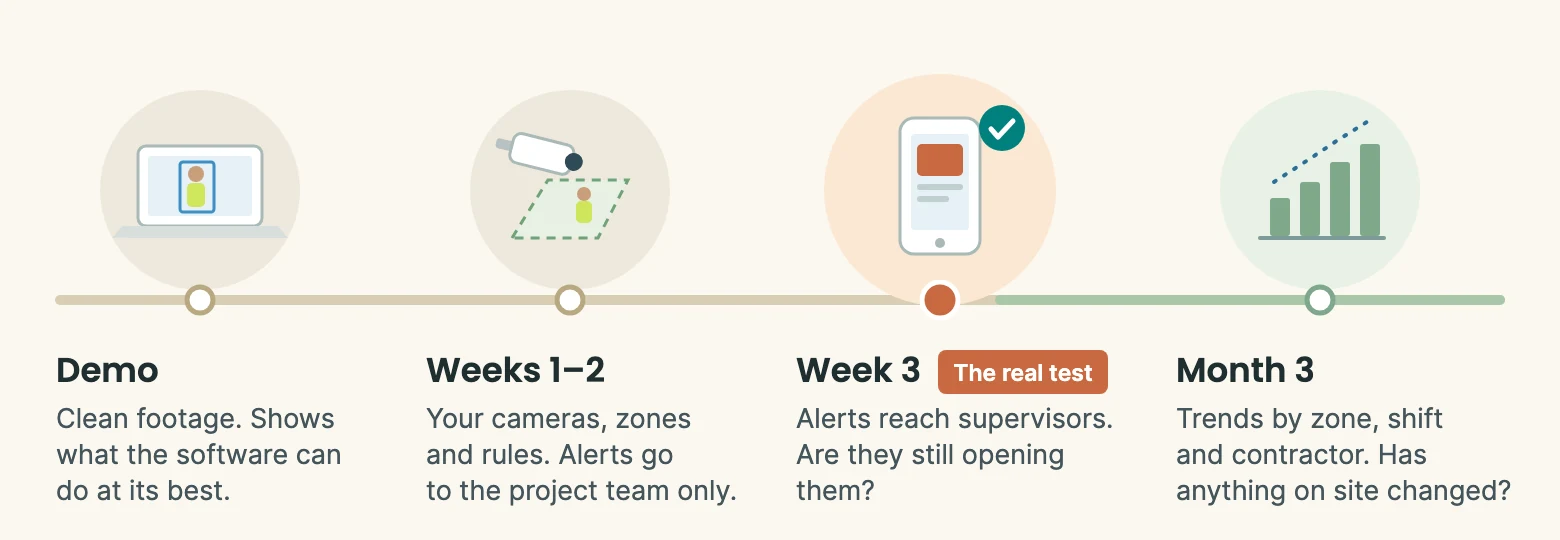
Every computer vision demo looks good. The footage is clean, the camera is well placed and each hard hat gets a neat box around it. The real test comes weeks later on your own site, when the sun is low, a new contractor has arrived and your supervisors have decided whether the alerts are worth opening.
The short answer: judge a worksite safety platform by how it behaves on your site in week three, not in the demo. Start from the risks that could seriously hurt people on your site. Then check that it works with your cameras, keeps running when the connection drops, gets alerts to the right person, keeps false alarms down and gives you records you can use. This article turns each of those into questions, with a checklist for comparing suppliers.
We build these systems, from PPE detection to workforce safety tracking, as part of our video analytics work.
Start with the risks
PPE detection leads most demos because it is easy to show. It may not be your biggest risk. The UK regulator's latest figures record 126 workers killed in Great Britain in 2025/26: 31 in falls from height, 24 struck by moving vehicles, 21 struck by moving objects and 18 trapped by something collapsing or overturning. Those figures are provisional and your site will have its own pattern, so start with your own incident and near-miss records. Then ask what a camera can do about each risk:
- Missing PPE. Usually the simplest place to start, within clear limits.
- Exclusion zones. A person inside a marked area around running machinery or under a lift. A good fit for cameras when the zone is in clear view.
- Edges and openings. The same idea, as long as a camera can see both the edge and the person near it.
- Vehicles and people. Forklifts or plant close to people on foot. This depends on speed as much as detection.
- Person down. Someone lying still after a fall or collapse. Expect false alarms from people kneeling or resting.
- Fire and smoke. Useful in large open areas as an extra layer on top of your fire alarm system, not a replacement for it.
Then ask each supplier which of these run on live sites today and which are still on a roadmap. Our own projects have covered PPE compliance, restricted zones and unsafe behaviour such as slips and entry into hazardous areas.
Works with your cameras
A platform should read standard camera streams, such as RTSP or ONVIF, rather than tie you to one brand of camera. Most sites can reuse much of their CCTV, but "no new cameras needed" is a claim to test, not a promise. Ask what resolution and frame rate it needs, then give the supplier recorded footage from your own cameras, including the worst ones.
Remember that each risk needs its own view. A camera that suits PPE detection won't always suit an exclusion zone on the far side of a yard.
Where it runs
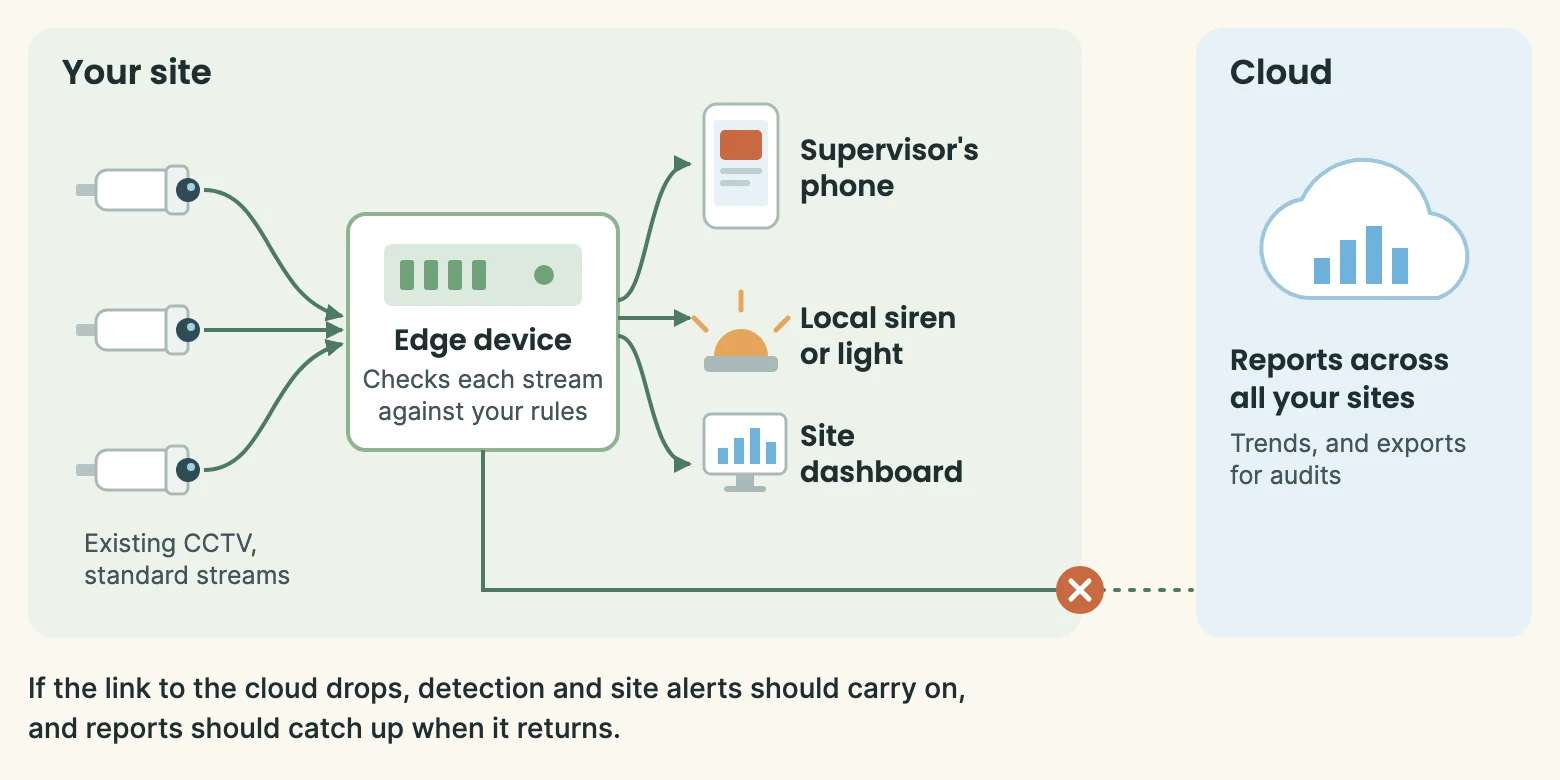
Analysis can run on a device on site (the edge), in the cloud, or both. For safety alerts, on-site processing usually makes more sense. An alert about someone walking into a danger zone shouldn't depend on your internet connection, and video doesn't have to leave the site. The cloud suits reporting and comparing sites.
Ask what happens when the connection drops. Does detection carry on? Do alerts still reach people on site? Are events stored and sent later? Don't take the answer on trust: unplug the site's internet for an hour during the pilot and see.
Alerts that reach the right person
An alert only helps if the right person sees it in time to act. Four things decide that:
- Speed. Measure the time from the event to the supervisor's phone. A missing vest can wait a minute. For the most urgent risks, ask about a local siren or light, because a phone in a pocket may be too slow.
- Channel. Use something supervisors already carry and check, not another screen to watch.
- Routing and escalation. Send alerts by zone and shift, and pass them to the next person if nobody responds.
- Evidence. A snapshot or short clip lets a supervisor judge an alert in seconds.
Handling false alarms
Every platform raises false alarms. What matters is what happens next. Can a supervisor mark an alert as wrong in one tap? Can thresholds and zones be set per camera? Who retrains the model when your site changes, and how long does that take?
Track two numbers each week, per camera: the share of alerts that were real, and the share that supervisors opened. The second tells you the most. If people are still opening alerts in week three, the system has earned their trust. If not, it is already being ignored.
Reporting
Injury rates tell you what has already gone wrong. Cameras can add what OSHA calls leading indicators: measures that can reveal problems before anyone is hurt. Useful ones include zone entries per shift, PPE compliance by zone and contractor, and how long alerts take to close, which mirrors OSHA's own example of the time taken to respond to a hazard report. Look for trends rather than single events, because one gate or one crew can account for most of a problem.
Check the records too. You should be able to export events with times and snapshots for an HSE audit, in a format you can keep. Our workforce safety project logs violations for audits and training, and shows zone activity and compliance on live dashboards.
Privacy, security and data ownership
Ask where video goes, how long it is kept and who can see it. Retention should be a setting you control. Video and snapshots should be encrypted, and access should be limited to named people, with a record of who viewed what. Ask who owns the footage, the events and any models trained on your site, and how you get them out if you leave.
Tell the workforce before go-live what is being checked and why. If a supplier offers face recognition, treat it as a separate decision and take legal advice: the UAE's federal Personal Data Protection Law lists biometric data among its sensitive categories, and the DIFC and ADGM free zones have their own rules.
Pilot and commercial terms
Run a pilot before any site-wide deal, on the risk that matters most. Agree the scope and success measures in writing first: the share of alerts that are real, the time to alert and whether supervisors keep using it. Get the price for a full rollout now, including hardware, tuning and support, so a good pilot doesn't end in a surprise.
The checklist
Use this to compare suppliers. The right-hand column matters more than any demo.
| Ask | Test it in the pilot |
|---|---|
| Which of our top risks run on live sites today? | Ask to speak to a site running them |
| Does it work with our streams and our worst cameras? | Run it on recorded footage from those cameras |
| What keeps working if the connection drops? | Unplug the internet for an hour |
| How fast do alerts arrive, and what if nobody responds? | Stage test events and time them |
| Can supervisors flag wrong alerts and tune each camera? | Count real alerts and opened alerts every week |
| Can we see trends by zone, shift and contractor? | Export one week as if for an audit |
| Who owns the footage, events and trained models? | Get export and deletion terms in writing |
| What does a full rollout cost? | Get the price before the pilot starts |
Questions people ask
How many cameras can one edge device handle?
It depends on the hardware, the frame rate and how many models run on each stream, so ask for figures based on your setup. As a public reference, NVIDIA's DeepStream benchmarks show a Jetson AGX Orin at about 147 frames a second for one person-detection model. As a rough ceiling, that suggests about 5 cameras at 30 frames a second or 14 at 10. Each extra model, such as PPE detection, lowers it.
How long does deployment take?
A single-site pilot typically takes a few weeks from assessment to live alerts, depending on camera readiness and how much needs integrating. A wider rollout follows once you have agreed the pilot results.
How is it priced?
Suppliers charge in different ways, such as per camera, per site or by project, so compare the total for your full rollout. Our published guide range is $5,000 to $15,000 for a single site and $15,000 to $50,000 for multiple sites; a real figure comes after we have looked at your cameras. See the pricing page for what each covers.