8 wireframe tools for websites and mobile apps, and how to choose
A wireframe tool lets you lay out the structure of a website or app screen before anyone designs the visuals or writes code. The right one depends on how polished your wireframes need to be and who works on them with you. For most teams the short answer is: Figma if your final designs will be made there anyway, Balsamiq for quick sketch-style wireframes, Miro or Whimsical for working through ideas with clients, Penpot or Excalidraw if you want something free and open source, and Axure RP when a prototype needs real logic.
Older lists, including the earlier version of this article, still recommend InVision and Adobe XD. InVision closed its design services at the end of 2024, and Adobe XD has been in maintenance mode since 2023, with fixes but no new features, so neither is a sensible choice for new work.
Below are the eight tools we would consider today, what each suits, what you can use for free, and how to choose.
What a wireframe is, and is not
A wireframe shows what goes on a screen and in what order of importance: the navigation, the content blocks, the buttons and how screens connect. It deliberately leaves out colour, imagery and final copy, so that everyone discusses structure rather than taste. Changing a wireframe takes minutes; changing built software takes weeks.
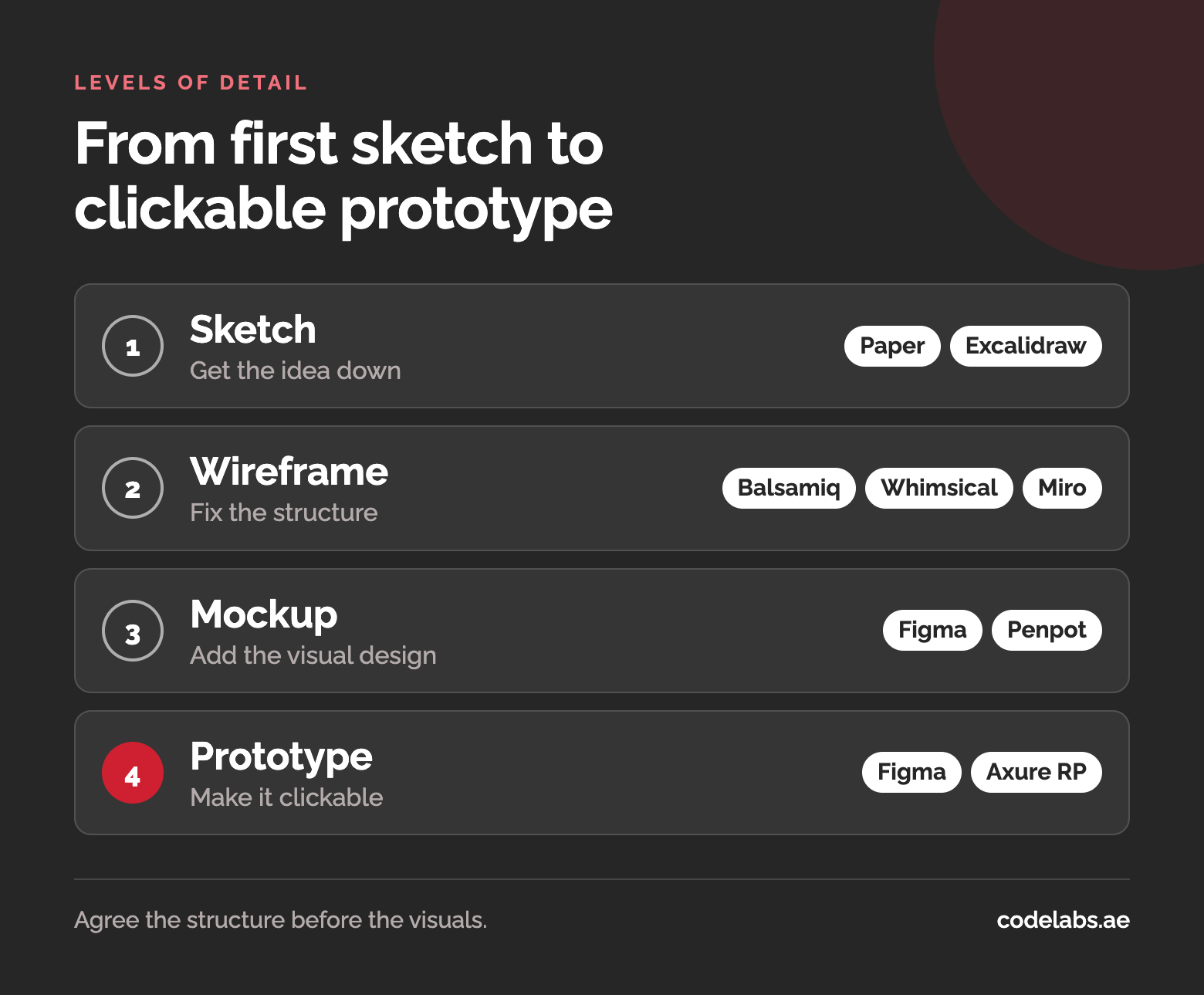
Wireframes sit on a ladder of detail. A sketch captures an idea; a wireframe fixes the layout; a mockup adds the visual design; a prototype makes it clickable. Some tools cover one step, others the whole ladder.
What to look for in a wireframe tool
- Speed. Can you lay out a screen in minutes, with ready-made components for web and mobile?
- The level of detail you need. Rough and sketchy keeps feedback on structure; polished tools let wireframes grow into the final design.
- Collaboration. Real-time editing, comments and easy sharing with clients who will not install anything.
- Clickable flows. Linking screens together shows whether a journey makes sense.
- Handoff. How easily the approved structure moves into visual design and development.
- Cost and data. Whether the free plan is enough, and where your files are stored.
The eight tools
1. Figma
Figma is where most product teams design today, which is its main strength for wireframing: the wireframes, the final screens and the developer handoff all live in one file. Ready-made wireframe kits make low-fidelity work fast, and FigJam, its whiteboard, is included for workshops. The free Starter plan is permanent but limited to a handful of files; paid plans remove the limits and add Dev Mode for developers.
2. Balsamiq
Balsamiq does one thing: quick, deliberately sketchy wireframes. The hand-drawn look stops reviewers commenting on colours and fonts, and its drag-and-drop controls make it easy for non-designers. It is a paid product with a free trial, and offers free licences to qualifying schools and nonprofits.
3. Penpot
Penpot is a free, open-source design tool that runs in the browser and covers wireframes, full UI design and prototypes. Teams that need to keep design files on their own servers can host it themselves, which matters for organisations with strict data rules. Its developer view, which shows the code behind a design, is free too.
4. Miro
Miro is an online whiteboard rather than a design tool, and that is why it works well early on: stakeholders can add sticky notes and sketch alongside the wireframe in a workshop. It has a built-in wireframe library. The free plan allows three editable boards, which suits a small project or a trial.
5. Whimsical
Whimsical combines wireframes, flowcharts and mind maps in one simple tool, so you can map a user journey and wireframe its screens side by side. Its limited set of components keeps wireframes consistent and quick to make. The free plan includes three boards.
6. Excalidraw
Excalidraw is a free, open-source whiteboard with a hand-drawn style, community libraries of wireframe elements, and simple link sharing for collaboration. It is the quickest way to get an idea out of your head and in front of someone else, and many teams use it for the sketch stage before moving to Figma or Penpot.
7. Axure RP
Axure RP is for prototypes that must behave like real software: conditional logic, variables, dynamic content and data-driven interactions, all without code. It suits complex systems such as dashboards and enterprise workflows, where a simple click-through cannot show how a screen responds. It is paid, with a 30-day free trial, and takes longer to learn than the others.
8. Uizard
Uizard generates wireframes and screens from a text description or a photo of a hand-drawn sketch, then lets you edit them. It is useful for getting a first draft on screen quickly, especially for non-designers. Miro bought it in 2024 and runs it as a separate product, with a small free plan. Treat what it generates as a starting point: the structure still needs to be thought through for your users.
Side by side
| Tool | Suits | Free option |
|---|---|---|
| Figma | Teams designing the final screens in Figma | Starter plan, limited files |
| Balsamiq | Fast low-fidelity wireframes | Free trial |
| Penpot | Open source, self-hosting | Free |
| Miro | Workshops with clients and stakeholders | Three editable boards |
| Whimsical | User flows and wireframes together | Three boards |
| Excalidraw | Quick sketches | Free |
| Axure RP | Complex, logic-heavy prototypes | 30-day trial |
| Uizard | First drafts from text or sketches | Small free plan |
How to choose
Start from who will use the wireframes. If a designer will turn them into the final screens, wireframe in the tool where that design will happen, usually Figma or Penpot, so nothing has to be redrawn. If the main goal is agreement with clients or managers, a rougher tool such as Balsamiq, Whimsical or a Miro board keeps the conversation on structure. Reach for Axure only when the logic itself needs testing.
For a first project, the free plans of Figma, Penpot or Excalidraw are enough to learn on. Upgrade when the limits, rather than your curiosity, start to get in the way.
How we wireframe
On client projects we wireframe before any visual design. We map the user flows first, lay out each screen at low fidelity, note what every element does, and plan the empty, loading and error states that are easy to forget. Clients click through a linked wireflow and review it in structured rounds, and only the approved structure moves into high-fidelity design in Figma. Our wireframing service page explains each step, and the Milan case study shows how rebuilding a product's structure first gave its redesign a solid base.
Questions people ask
Is Figma good for wireframing?
Yes, especially if the final design will also be done in Figma, because the wireframes can evolve into the finished screens without being redrawn. Its wireframe kits make low-fidelity work quick. A rougher tool can still be better for early workshops, where polish distracts from structure.
What is the difference between a wireframe, a mockup and a prototype?
A wireframe shows structure and layout without visual design. A mockup adds the visual design, such as colours, type and imagery, but is static. A prototype is clickable, so people can try the flow. Many projects move through all three, sometimes in the same tool.
Can AI create wireframes?
Tools such as Uizard can generate a first draft of screens from a text description or a sketch, which saves time at the start. The drafts are generic, though: deciding what each screen needs, in what order, for your users, is still the important work.
Do I need a wireframe tool at all?
Not for the first ideas: paper, a whiteboard or Excalidraw is enough. Once screens need to be shared, linked into a flow and reviewed by others, a dedicated tool saves a great deal of time.