Software project management: common challenges and how to fix them

Software projects rarely fail because the team cannot write the code. They struggle because the requirements were vague, the scope kept growing, decisions waited on the wrong person, or a risk everyone half-knew about arrived in the final month. Those are project management problems, and they have known fixes.
This guide covers the challenges that come up on almost every software project, for clients and for the teams building for them, with what to do about each: how to pin down requirements, control change, keep communication flowing, protect quality and manage risk.
What software project management covers
A software project manager keeps five things under control at once:
- Scope: what is being built, and what is not.
- Plan: the order of the work, the milestones and the date.
- Risk: what could go wrong, and what will be done about it.
- Communication: who needs to know what, and when.
- Quality: what "finished" means, and how it is checked.
The challenges below are what happens when one of these slips.
1. Requirements that are unclear or keep shifting
The most common problem starts before any code is written. A client knows the business problem but not yet the details; the team fills the gaps with assumptions; the two only discover the difference at the first demo.
The fix is a short discovery phase. Write requirements as user stories with acceptance criteria ("a patient can move a booking up to 24 hours before it starts"), sketch the main screens, and agree both before development starts. For larger projects, a feasibility study tests the riskiest assumptions first.
2. The client's view and the users' view differ
The person paying for the software is often not the person who will use it every day. A design that pleases the sponsor in a meeting can still confuse the warehouse team or the patient on a phone.
Put clickable prototypes in front of a few real users early, and watch them try the main tasks. It takes days, not weeks, and settles arguments with evidence. Our guide to wireframe tools covers how to sketch and test quickly.
3. Scope creep and change requests
Change is normal; a project that cannot absorb any is badly planned. Trouble starts when changes arrive informally, by message or in a meeting, and are built without anyone adding up their effect.
- Log every change request with its effect on time and cost before work starts.
- Have one named person on the client side approve changes.
- Rank features as must, should and could, so a new must-have can push a could-have out rather than pushing the date.
Our article on managing deadlines in software development covers estimates and change control in more depth.
4. Communication gaps
Most project surprises were known to someone a week earlier. Information gets stuck because nobody owns passing it on, or because status reports say "on track" until the day they do not.
Set a simple rhythm and keep it:
- a short daily check-in inside the team;
- a demo of working software every sprint, usually one or two weeks;
- a weekly written status: what was done, what is next, what is blocked, and the top risks;
- a decision log, so nobody relitigates a choice made a month ago.
Name one owner on each side. Many slow decisions are simply decisions with no one assigned to make them.
5. Missing documentation and knowledge in one head
When the only person who understands the payment integration goes on leave, the project stops. Heavy documentation nobody reads does not solve this; a small set of living documents does:
- a README that gets a new developer running in an hour;
- a one-page architecture overview;
- short records of key technical decisions and why they were made;
- a handover pack at the end: credentials, environments, deployment steps and support contacts.
6. Inheriting someone else's code
Taking over an existing system is harder than starting fresh, and estimates made before anyone has read the code are guesses. Start with a short paid audit: read the code, run it, check the tests and the deployment. Then add tests around the parts you will change before changing them, so you know when something breaks. Estimate the real work only after the audit.
7. Quality that nobody defined
If "done" is not defined, every feature is done when someone says so, and bugs pile up for the end. The Scrum Guide calls the fix a Definition of Done, "a formal description of the state of the Increment" when it meets the quality bar. In practice, a feature is done only when it is:
- built to its acceptance criteria;
- reviewed by a second developer;
- tested, with automated tests for the critical paths;
- deployed to a test environment the client can use;
- documented where it affects how the system is run.
8. Risks spotted too late
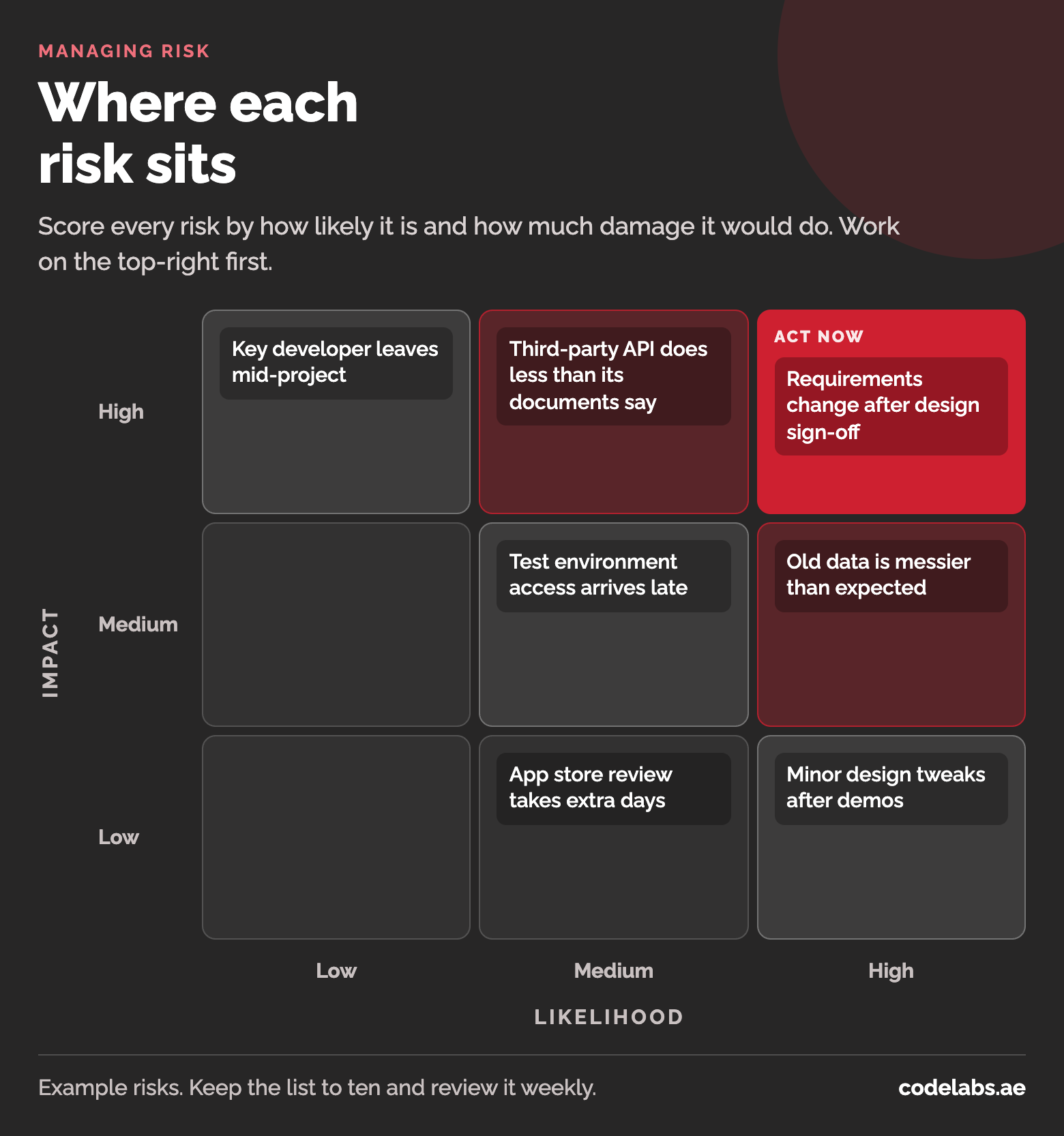
Every project has risks: a third-party API that may not do what its documents promise, a key person who may leave, data that may be messier than expected. They become problems when they are discussed once at kickoff and never again.
Keep a short risk register, no more than ten items, each scored by how likely it is and how much damage it would do, with an owner and a planned response. Review it every week. The highest-scoring risks deserve work now, such as building the risky integration first.
Agile, waterfall or something in between?
Most of these practices work whatever method you follow. Agile methods such as Scrum suit products whose requirements will be refined as people use them; a more sequential plan suits fixed, well-understood scope, such as a regulatory report. Many projects combine the two: a fixed scope and price for a first release, delivered in short sprints with regular demos. Our guide to SDLC methodologies compares the options, and our article on CMMI explains what process maturity ratings mean when you assess a supplier.
How we run projects at CodeLabs
Every project starts with a free scoping call and a written proposal with the scope, timeline and a fixed quote. Payments are tied to milestones such as kickoff, design approval and delivery. We build in iterative sprints with regular demos and keep the work visible in Jira, Figma and Confluence. Clients are most involved at the start and at milestones, and review working software at each stage rather than waiting for a big reveal at the end.
If you are planning a project, our custom software development page explains how we work.
Questions people ask
Does a small project need a dedicated project manager?
It needs someone doing the job, not necessarily a full-time title. On small projects the lead developer or a delivery lead often covers it; what matters is that one person owns the plan, the risks and the communication.
Which project management tools should we use?
Fewer than you think. One tracker for the work, such as Jira, one place for documents, and one channel for decisions cover most projects. The rhythm of demos, status notes and risk reviews matters more than the tool.
How do we stop a project from going over budget?
Fix the scope of the first release, rank features by priority, record every change with its cost before it is built, and review spend against progress at each milestone. Budget overruns are usually unrecorded scope growth.