Features of educational software: the 8 that matter

Educational software is any software built to help people learn or to run learning: apps that learners use directly, learning management systems (LMS) that deliver courses and track progress, and tools for teachers, trainers and parents. Whatever the type, the same eight features decide whether it gets used: a simple interface, personalised learning, assessment with instant feedback, progress tracking, engaging content, accessibility and language support, access on any device including offline, and privacy with open standards.
This article explains each feature, what good looks like, and what to check before you choose or build a platform. It draws on our own work in education technology: we built Todly, a learning app for young children, and we build and repair LMS and SCORM integrations.
Types of educational software
- Learning apps that learners use on their own, from early-years games to language and exam practice.
- Learning management systems that host courses, enrol learners, track completion and report results, such as Moodle or Canvas, or a platform built for one organisation.
- Classroom and school tools for timetables, attendance, assignments and communication with parents.
- Assessment tools for quizzes, exams and skills checks.
- Authoring tools that let teachers and trainers create their own interactive content.
Most products combine several of these. The features below apply to all of them, with different weight depending on who the learners are.
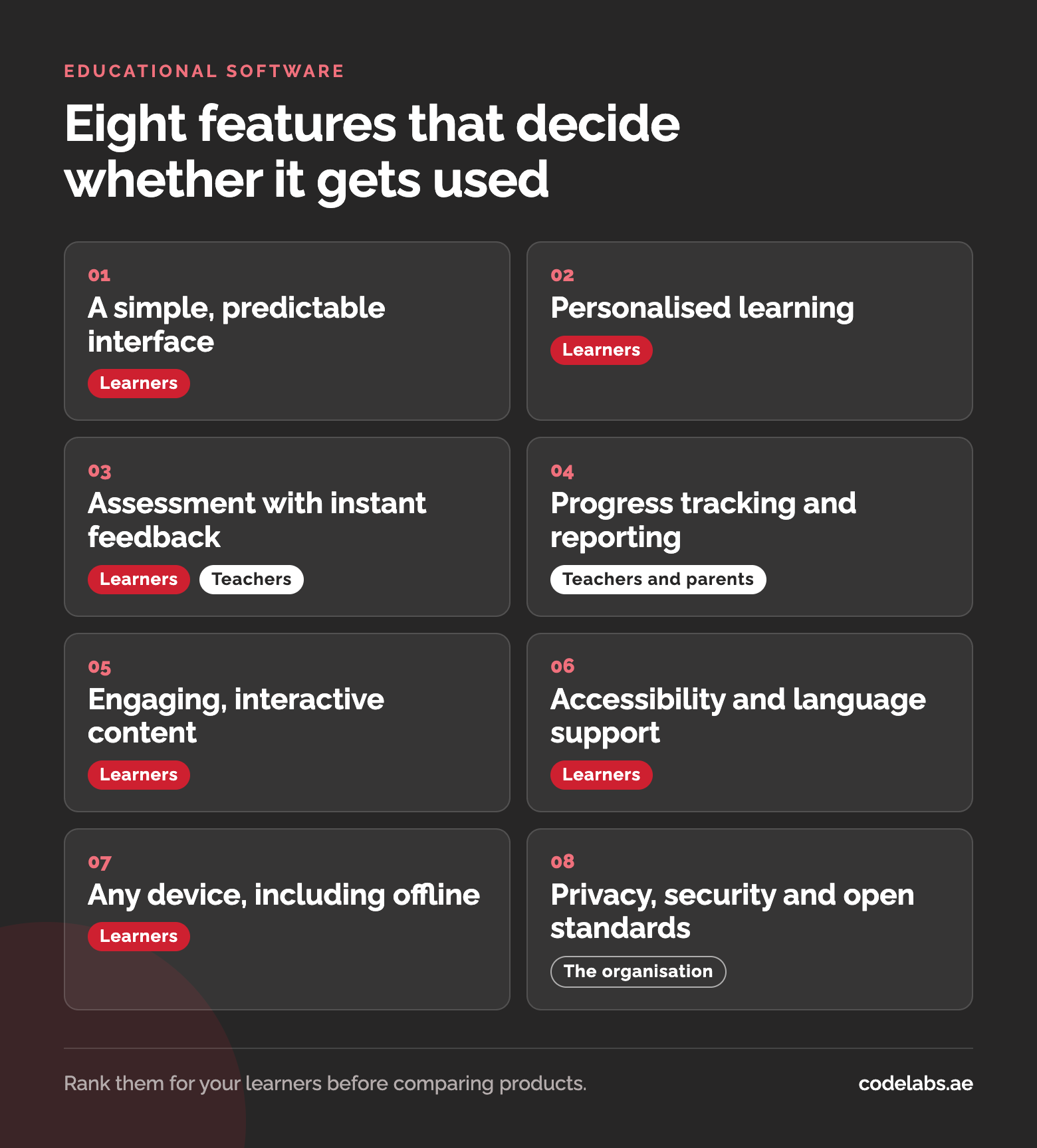
The eight features that matter
1. A simple, predictable interface
Learners should spend their attention on the subject, not on the software. That means few choices per screen, large touch targets, consistent navigation, and a design that suits the age group: picture-led for young children, efficient and keyboard-friendly for adults. Test it with real learners early, because what feels obvious to the people who built it rarely is to a first-time user.
2. Personalised learning
Learners start at different levels and move at different speeds. Good software adapts: it skips what a learner already knows, slows down where they struggle, and suggests what to do next. In Todly, the app we built for early learners, activities adapt their difficulty to how each child is doing. Personalisation can be as simple as a placement quiz and optional modules; it does not have to start with artificial intelligence.
3. Assessment with instant feedback
Quizzes, exercises and practical tasks show whether learning is happening. The feedback matters as much as the score: explain why an answer is wrong, point to the part of the lesson to revisit, and let the learner try again. Teachers need the same information in aggregate, so they can see which questions most of the class gets wrong.
4. Progress tracking and reporting
Every audience needs its own view. Learners want to see how far they have come, teachers and trainers need class and individual progress, parents want a simple summary, and organisations need completion and compliance reports. Todly gives parents real-time insight into their child's learning habits. In corporate training, the reports are often what the platform is bought for, so the data behind them has to be recorded correctly.
5. Engaging, interactive content
Video, interactive exercises, simulations and game elements such as points, levels and badges keep learners coming back. Used well, they support the learning; used badly, they replace it with tapping for rewards. Tie every reward to something the learner actually learned or practised.
6. Accessibility and language support
Educational software should work for learners with visual, hearing, motor or cognitive needs: captions on video, screen-reader support, good contrast and full keyboard navigation. Language matters too. In the UAE and across the Gulf, that usually means Arabic and English in the same product, with right-to-left layouts that are designed properly rather than mirrored as an afterthought.
7. Works on any device, including offline
Many learners use a phone, not a laptop, and connections are not always reliable. Lessons should work on small screens and, where possible, download for offline use, with progress synchronising when the device is back online. This matters most for field staff, travellers and younger learners using a shared family device.
8. Privacy, security and open standards
Educational platforms hold personal data, often about children. Collect only what you need, protect it, give parents control where children are involved, and know which data protection rules apply where your learners are. Open standards matter for a different reason: content built to SCORM, xAPI or cmi5, and tools connected through LTI, work across learning platforms, so courses are not locked into one system and completions are recorded properly. Our LMS and SCORM development page explains what each standard does.
Mistakes to avoid
- Choosing by the length of the feature list. A platform with two hundred features that your teachers find confusing will lose to a simple one they use every day.
- Forgetting the teachers. If creating a quiz or checking progress takes longer than doing it on paper, the software will quietly stop being used.
- Rewards without learning. Badges and points that can be earned without learning anything teach learners to chase the badges.
- Leaving offline and Arabic for later. Both shape how the platform is built, and adding them afterwards costs far more than planning them in.
- Collecting data you do not need. Every extra field about a learner, especially a child, is something you have to protect and justify.
Choosing or building educational software
An off-the-shelf LMS is the quicker option when your courses fit its model: enrol, learn, test, certify. A custom platform is worth considering when the learning experience is your product, when you need integrations an existing platform cannot provide, or when your learners need something specific, such as a game-based app for young children.
Either way, write down which of the eight features matter most for your learners before you look at products or ask for quotes. It turns a confusing comparison into a short checklist. The Todly case study shows how these features came together in a learning app we designed and built, and our custom software team builds platforms when an existing one does not fit.
Questions people ask
What is the difference between educational software and an LMS?
An LMS is one type of educational software. It manages learning: hosting courses, enrolling learners, tracking progress and reporting results. Educational software also includes learning apps, assessment tools and classroom tools, which may work alongside an LMS or on their own.
Which features matter most for a children's learning app?
A simple, picture-led interface, content matched to the child's level, safe design with parental controls, and progress reports parents can understand. Child safety and data privacy need to be planned from the start, not added at the end.
Does educational software need to work offline?
Not always, but it helps whenever learners have unreliable connections or learn on the move. Downloadable lessons with progress synchronised later are a common solution. Decide early, because offline support affects how the whole platform is built.